

30+ Models to Test When Transcribing Multiple Speakers for Dev Teams
If you control the recording setup, use multichannel transcription and assign one microphone per speaker; if you’re stuck with a single mixed-audio file, use speaker diarization with deliberate preprocessing. Batch processing wins on accuracy for post-production work, while streaming suits live, interactive applications where latency matters. Either path returns speaker labels and timestamps, but the accuracy ceiling depends heavily on audio quality and how you configure diarization parameters.
TL;DR:
- Employ multichannel transcription whenever you can capture separate audio channels, as it inherently offers higher accuracy compared to diarization.
- When using diarization, ensure you set correct speaker count parameters and record with optimal audio quality, such as uncompressed formats and controlled gain, to improve clustering accuracy.
- Overlapping speech remains a major challenge for both methods, but multichannel setups significantly mitigate crosstalk errors better than diarization does during live recordings.
- Manual review based on confidence scores is essential to correct speaker-boundary errors and improve overall transcript reliability, especially in multi-speaker recordings.
- Testing multiple models with representative audio samples allows benchmarking to choose the most accurate and cost-effective solution rather than relying on a single vendor.
Table of Contents
- What’s the Best Way to Transcribe Multiple Speakers?
- How Do You Set Up Multi-Speaker Transcription in Code?
- What Recording Setup Improves Diarization Accuracy?
- How Does OpenTranscription Handle Multi-Speaker Audio?
- What About Fixing Transcription Errors by Hand?
- How Do You Handle Overlapping Speech and Crosstalk?
- What Privacy Considerations Apply to Multi-Speaker Transcripts?
- How Do You Measure Transcription Accuracy With Multiple Speakers?
- The Practical Gap Nobody Talks About
- Get Structured, Speaker-Aware Transcripts Without Vendor Lock-In
- Sources
- FAQ
What’s the Best Way to Transcribe Multiple Speakers?
Two distinct technical approaches handle multi speaker transcription, and they solve different problems. Confusing them is the most common reason teams end up with unusable output.
Speaker diarization is a clustering process. The transcription model listens to a single mixed audio stream and uses acoustic features (pitch, cadence, spectral patterns) to group utterances by speaker, then assigns generic tags like spk_0, spk_1, and so on. Some services support diarization for up to 30 unique speakers, with output structured as speaker_labels tied to per-utterance timestamps. Diarization is the only viable option when speakers share a microphone, such as in-person interviews, panel recordings, or phone calls captured on a single line. Its weakness is clustering error: overlapping speech, similar-sounding voices, or poor recording quality can cause the model to merge two speakers into one tag or split a single speaker into two.
Multichannel transcription sidesteps clustering entirely. Each audio channel is transcribed independently and mapped to a channel_index, on the assumption that one speaker occupies one channel. Because there’s no acoustic guesswork involved, multichannel processing is inherently more accurate than diarization whenever you can actually capture separate channels, such as multi-track podcast recordings, call-center systems with agent and customer on distinct lines, or lab setups using individual lavalier mics.
Trade-offs to weigh:
- Diarization handles unknown or variable speaker counts better; multichannel requires you to know the channel-to-speaker mapping in advance.
- Overlapping speech degrades diarization accuracy more than multichannel, since crosstalk on separate channels still transcribes cleanly per channel.
- Multichannel output can return either separate per-channel transcripts or a single combined, time-ordered transcript tagged by channel.
- Diarization output typically looks like
{"speaker_label": "spk_1", "start_time": "12.4", "end_time": "13.1"}; multichannel output looks like{"channel_index": 0, "start_time": "12.4", "text": "..."}.
How Do You Set Up Multi-Speaker Transcription in Code?
Implementation splits into two patterns: batch jobs for pre-recorded audio and streaming for live interaction.
Batch transcription for a mixed recording typically follows these steps:
- Upload the audio file (WAV or FLAC preferred over compressed formats).
- Set diarization parameters, most importantly
min_speaker_countandmax_speaker_count. Cloud Speech-to-Text and similar APIs expose adiarizationConfigobject for exactly this purpose, and getting the range wrong is the single most common cause of bad output. If you guess 2 speakers on a 4-person call, the model will force everyone into two clusters. - If you have separate audio tracks instead, set
use_multi_channel: trueand skip diarization parameters entirely. There’s no speaker count to guess because the channel mapping already defines it. - Submit as a long-running job for files over a few minutes, then poll for completion.
- Parse the returned
wordsarray. Each word object carries aspeakerTagorspeaker_labelfield plus start and end offsets, and you can group words into speaker segments by watching for tag changes.
Streaming transcription for live calls or interactive apps requires a different model selection entirely. Confirm the model supports speaker partitioning in realtime mode. Not all do, and some trade away word-level timestamps and speaker labels for lower latency. If your application needs both, pick a realtime-capable model that explicitly documents speaker tagging in streaming mode, and budget for latencies under 150 milliseconds if the use case is conversational.
Post-processing turns raw word arrays into readable transcripts. The core logic:
segments = []
current_speaker = null
current_text = []

for word in words:
    if word.speaker != current_speaker:
        if current_text: segments.append(join(current_text))
        current_speaker = word.speaker
        current_text = [word.text]
    else:
        current_text.append(word.text)
This collapses a word-by-word array into speaker-labeled paragraphs, which is what most downstream applications (transcripts, meeting notes, subtitles) actually need.
Pro Tip: Log the confidence score attached to each word, not just the transcript text. Low-confidence spans often coincide with speaker-boundary errors, so filtering on confidence gives you a fast way to flag segments for manual review instead of proofreading the entire transcript line by line.
What Recording Setup Improves Diarization Accuracy?
Diarization accuracy is decided mostly before the audio ever reaches an API. No amount of parameter tuning fixes a bad recording.
If you have any control over capture, take it. Separate channels and consistent microphone gain across speakers make the biggest difference of any single choice you can make, since assigning one microphone per speaker eliminates clustering error entirely rather than reducing it. Record at 16 to 48 kHz in an uncompressed or lossless format (WAV, FLAC) and avoid mobile call codecs, which strip frequency ranges that diarization models rely on to distinguish voices.
When you’re stuck with single-channel, mixed audio:
- Apply noise reduction and voice activity detection (VAD) before transcription to strip dead air and background hum.
- Normalize loudness across the file so quieter speakers aren’t lost relative to louder ones.
- Remove background music where possible; it confuses both diarization clustering and word-error rates.
- Physically separate speakers during recording when you can, since reduced overlap directly reduces crosstalk errors downstream.
For long recordings, chunking introduces its own failure mode: speaker identity can reset at each chunk boundary if the model has no context from the previous segment. Preserving a short overlap window of one to two seconds between chunks gives the model enough continuity to keep speaker tags consistent across the boundary rather than restarting the clustering from scratch.
Before running a full batch job, test on short clips that sample each speaker individually. Verify your min_speaker_count and max_speaker_count settings actually match the real number of voices in the room, and check the confidence scores and timestamps on a handful of segments. A quick five-minute sample test catches parameter mistakes that would otherwise waste a full-length transcription job.
How Does OpenTranscription Handle Multi-Speaker Audio?
A unified API can provide access to multiple transcription models, allowing comparison of diarization accuracy which varies substantially model to model. Rather than committing to one vendor’s diarization engine, you can benchmark models against your actual audio and switch based on cost, speed, or accuracy for the specific speaker count and recording quality you’re working with.
Some platforms support both realtime streaming for live, speaker-aware applications and batch processing for pre-recorded, multichannel, or single-stream diarization jobs. Output may include speaker identification, word-level timestamps, confidence scores, and be structured consistently across models to ease integration. Multilingual support can include a large number of languages, which is helpful for teams transcribing multilingual or international audio.
Some transcription services use pay-as-you-go billing per second of audio processed without subscription commitments. This approach suits teams evaluating different diarization or multichannel methods by enabling testing several models against the same file before choosing a solution.
What About Fixing Transcription Errors by Hand?
Automatic diarization and ASR rarely produce a publish-ready transcript on the first pass, especially for multi speaker transcription with more than two or three voices. Manual review closes the gap between “usable” and “accurate.”
Start with the confidence scores rather than reading the transcript top to bottom. Most APIs return a per-word confidence value, and clustering the low-confidence spans lets you jump directly to the sections most likely to contain speaker misattribution or transcription errors, instead of proofreading text that’s probably already correct.
Speaker-boundary errors are the most common fix required. Watch for segments where the tone or vocabulary shifts mid-utterance without a corresponding speaker tag change; that’s usually a sign the diarization model merged two speakers. The opposite error, one speaker split into two tags because their voice varied (coughing, distance from the mic, emotional tone), shows up as suspiciously short segments that alternate tags rapidly within a single exchange.
Standardize how you label speakers once identity is confirmed. Automated tags like spk_0 or channel_index: 1 mean nothing to a reader; replacing them with actual names or roles (“Interviewer,” “Dr. Chen”) during review turns a raw transcript into a usable document. Many teams handle this with a find-and-replace pass once each generic tag is matched to a real identity, applied consistently across the full transcript rather than speaker by speaker.
Keep a lightweight style guide for punctuation and filler-word handling (whether to include “um,” how to mark inaudible sections) so multiple editors correcting the same batch of interviews don’t produce inconsistent output.
How Do You Handle Overlapping Speech and Crosstalk?
Overlapping speech is the single hardest problem in multi speaker transcription, and no current model fully solves it. When two people talk simultaneously, a diarization model has to choose one speaker’s audio to prioritize, and both diarization and multichannel approaches degrade in accuracy during genuine crosstalk, just for different reasons.
With diarization on a single mixed stream, overlapping voices blend into one acoustic signal, and the clustering algorithm typically assigns the entire overlapping segment to whichever speaker’s voice is more dominant in the mix. The other speaker’s words are often dropped, garbled, or misattributed entirely. This is a structural limitation of processing a single audio channel, not a parameter you can tune away.
Multichannel transcription handles crosstalk far better because each channel still captures its own speaker cleanly, even while the other speaker talks over them on a different mic. You lose some clarity from bleed-through (a loud speaker’s voice picked up faintly on a neighboring channel), but each channel’s primary content stays intact and transcribes normally.
Practical mitigation for unavoidable crosstalk:
- Flag likely overlap zones for manual review rather than trusting the automated output, since these segments carry disproportionate error risk.
- If you’re recording live interviews, brief participants on turn-taking. Reducing interruptions at the source is more effective than any post-processing fix.
- For phone or video calls, consider platforms that provide separate audio tracks per participant. This converts a crosstalk problem into a multichannel problem, which is easier to solve.
- Cross-reference video, when available, since visual cues (who’s visibly speaking) can resolve ambiguous audio segments that transcripts alone can’t.
What Privacy Considerations Apply to Multi-Speaker Transcripts?
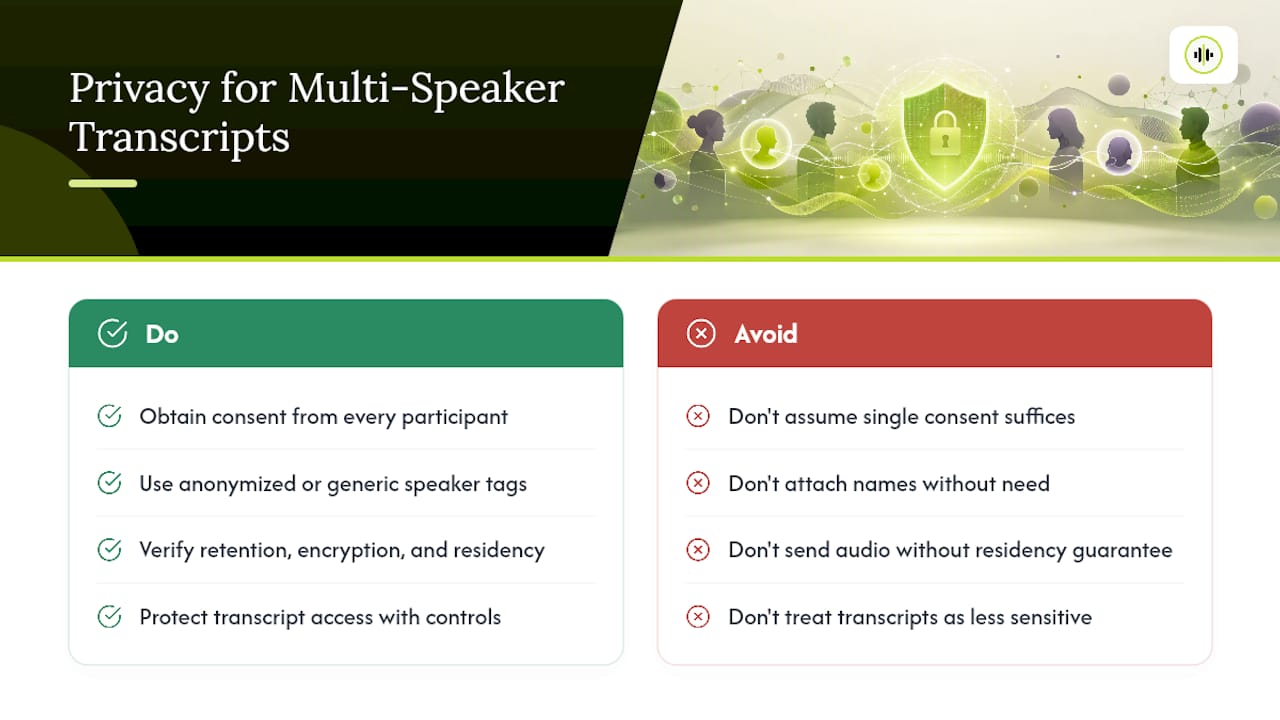
Multi speaker recordings often carry higher privacy exposure than single-speaker audio because they typically capture identifiable conversations involving several people who haven’t individually consented to processing, not just the one person who initiated the recording.
Consent scope matters more here than in single-speaker transcription. If you’re transcribing interviews, meetings, or calls involving multiple participants, verify that consent covers every voice on the recording, not just the interviewer or the person who hit “record.” This becomes especially relevant for recorded customer calls, focus groups, or panel discussions where several people are speaking without necessarily having agreed to automated processing of their voice.
Speaker labels themselves are a data point worth handling carefully. A diarization output that ties spk_1 to a specific role or name effectively re-identifies that individual across the entire transcript, which raises the sensitivity of the file compared to an anonymized version. If a transcript will be shared or stored long-term, consider whether generic speaker tags are sufficient or whether names need to be added, redacted, or handled separately from the base transcript.
Where you send audio for processing matters as much as how you process it. Check whether your transcription provider retains audio after processing, what encryption applies in transit and at rest, and whether the service supports data residency requirements relevant to your industry. Healthcare, legal, and financial recordings in particular tend to carry regulatory obligations around retention and access that go beyond general best practice.
Build access controls around the finished transcript, not just the audio. A speaker-labeled transcript is often more sensitive than the raw audio file, since it’s searchable and easier to skim for specific statements by specific people.
How Do You Measure Transcription Accuracy With Multiple Speakers?
Standard word error rate (WER) is not enough for multi speaker transcription, because a transcript can get every word right and still be useless if the words are attributed to the wrong speaker.
The metric that matters most alongside WER is speaker-attribution accuracy: the percentage of words correctly assigned to the right speaker tag, independent of whether the word itself was transcribed correctly. A transcript can have low WER and high speaker-confusion error simultaneously, particularly in recordings with more than three or four voices, where clustering has more opportunities to merge or split speakers incorrectly.
Practical evaluation steps:
- Sample transcripts across a range of speaker counts, not just your easiest two-person test case, since diarization error compounds as speaker count rises.
- Check confidence scores against known-correct segments to calibrate what a “reliable” confidence threshold looks like for your specific audio conditions.
- Spot-check timestamp accuracy, particularly at speaker-boundary transitions, since drift here is often the first symptom of an emerging clustering problem later in the file.
- Compare output from more than one model on the same audio sample before committing to a single provider for a production workflow. Accuracy on multi speaker files varies more between models than accuracy on clean, single-speaker audio does.
Testing against your own representative audio, rather than trusting a vendor’s general accuracy claims, is the only reliable way to know how a model performs on your specific mix of speaker count, audio quality, and overlap frequency.
The Practical Gap Nobody Talks About
Most guidance on transcribing multiple speakers treats diarization as the default and multichannel as an edge case for people with fancy recording setups. That framing has it backwards. Multichannel isn’t a luxury; it’s the correct engineering choice whenever you have any influence over how the audio gets captured, and the accuracy gap between the two approaches is wide enough that teams should be redesigning their capture pipeline before they touch a single diarization parameter.
The overrated piece of conventional wisdom is that better diarization models will eventually close this gap. They won’t, not fully, because the problem is information-theoretic: a single mixed channel genuinely contains less speaker-identity signal than separate channels do. No amount of model improvement recovers information that was never captured.
What should come first, before model selection or parameter tuning, is an honest audit of your recording pipeline. If you’re building a product around multi-speaker transcription, the highest-leverage engineering decision is architecting separate audio capture wherever the use case allows it. Diarization, careful preprocessing, and model benchmarking are the tools you reach for when that’s not possible, not the starting point.
— Benjamin
Get Structured, Speaker-Aware Transcripts Without Vendor Lock-In
The core problem this guide keeps circling back to is that no single diarization or multichannel model performs best across every audio condition, speaker count, and language. OpenTranscription solves that by giving you access to more than 30 speech-to-text models through one API, so you can test which model handles your specific multi-speaker audio best instead of committing upfront to a single vendor’s accuracy ceiling.
Every model in the catalog returns structured output with speaker identification, word-level timestamps, and confidence scores, which means the post-processing logic described earlier in this guide works the same way regardless of which model you choose. If your application needs low-latency, speaker-aware transcription for live use cases, the realtime model rankings help you pick a streaming-capable option that fits your latency budget. Billing is per second of audio, with no subscription required, so you can benchmark several models against a real sample of your audio before deciding which one earns a permanent place in your pipeline. Start by uploading a representative multi-speaker file and comparing the output across models directly.
Sources
- Partitioning speakers (diarization) - Amazon Transcribe
- How to: multichannel transcription (ElevenLabs docs)
- Detect different speakers in an audio recording | Cloud Speech-to-Text
FAQ
Are AI Transcribers Legal to Use?
Yes, AI transcription tools themselves are legal, but recording and transcribing conversations involving multiple people is governed by consent laws that vary by jurisdiction and by whether the conversation is one-party or all-party consent. Verify the applicable recording-consent rules for your situation before transcribing calls or meetings involving other people.
Can ChatGPT Transcribe Audio With Multiple Speakers?
General-purpose chat models are not built for accurate speaker diarization or multichannel transcription; they typically lack the timestamped, speaker-tagged output structure that dedicated speech-to-text APIs provide. Use a transcription-specific model or API that explicitly supports diarization or multichannel processing instead.
How Do You Perform Speaker Diarization?
Speaker diarization works by clustering speech in an audio file based on acoustic features, then assigning each cluster a generic speaker tag alongside timestamps. Most APIs let you configure it by setting a minimum and maximum expected speaker count and then parsing the returned words array for speaker tags.
How Do You Transcribe Very Long Audio Files?
Long audio is typically processed as a batch job rather than in one continuous stream, submitted asynchronously and polled for completion. When chunking is necessary, preserving a short overlap between chunks helps maintain speaker continuity across the boundary instead of resetting speaker identity at each cut point.
What’s the Difference Between Diarization and Multichannel Transcription?
Diarization identifies speakers algorithmically within a single mixed audio stream, while multichannel transcription assigns each speaker to a separate, pre-recorded channel and requires no clustering at all. Multichannel is generally more accurate when you can capture separate channels; diarization is necessary when speakers share one microphone.