

Stop STT Misroutes: 2–5s Speech Language Detection for Developers
For most speech pipelines, the right move is running acoustic language detection before speech-to-text, not after: analyze a short window of raw audio, classify the language, then route to the correct STT engine. Use at-start detection when input audio stays in one language, and continuous detection when speakers may switch mid-stream. Pair either mode with voice activity detection and a model trained on a broad corpus like VoxLingua107. Platforms such as OpenTranscription let you test this routing logic against multiple STT models without building the comparison harness yourself.
TL;DR:
- Use at-start language detection combined with voice activity detection to improve accuracy and reduce unnecessary computations in single-language scenarios.
- Implement continuous detection only if your application involves frequent language switches, such as multilingual meetings or Bilingual call centers.
- Constrain candidate language lists and avoid regional duplicates to improve classification reliability and limit false positives.
- Run detection on high-quality, mono PCM audio with sufficiently long windows of a few seconds to balance speed and accuracy, especially in streaming contexts.
- Test models against your actual audio data, using benchmark tools to validate accuracy and latency before committing to specific providers or deployment modes.
Table of Contents
- How Does Language Detection in Speech Actually Work?
- At-Start vs. Continuous Language Identification: Which Do You Need?
- Building a Robust LID Pipeline: VAD, Chunking, and Error Handling
- Where Should Language Detection Run: On-Device, Browser, or Cloud?
- How Accurate Is Language Detection, and How Do You Benchmark It?
- A Practical Checklist for Adding LID to Your Speech Pipeline
- Matching OpenTranscription to These Implementation Needs
- What Teams Get Wrong When Shipping Language Detection
- Test Your Language Detection Pipeline Against Real Models
- Sources
- FAQ
How Does Language Detection in Speech Actually Work?
Speech language identification (LID) works on the raw acoustic signal, not on transcribed words. That distinction matters because a model trying to guess whether someone is speaking Portuguese or Spanish doesn’t need to understand a single sentence. It needs to recognize phoneme patterns, rhythm, and prosody, the same cues a human ear picks up on before a coherent sentence even forms.
Most systems convert raw audio into mel-spectrograms or MFCCs (Mel-Frequency Cepstral Coefficients), compact representations of frequency content over time. These features strip out a lot of noise while preserving the acoustic fingerprints that differ across languages. That’s a fundamentally different input than the tokenized text a language model consumes downstream.
On top of those features, three model families dominate production LID systems today:
- x-vector/TDNN architectures, originally built for speaker verification, adapted to capture language-discriminative embeddings from short audio segments.
- CNN-based classifiers, which treat spectrograms like images and apply convolutional filters to detect language-specific texture in the frequency domain.
- Transformer and conformer models, which handle longer-range temporal dependencies and tend to outperform older architectures on code-switched or accented speech.
Regardless of architecture, the output an API or SDK returns to your application usually looks the same: a language code (often in BCP-47 format like es-MX or pt-BR), a confidence score, and in well-built systems, an explicit “unknown” or “und” (undetermined) label when the input doesn’t match any trained class confidently. That undetermined signal is not a bug. It’s the model refusing to force a guess on an out-of-distribution input, and ignoring it is how routing errors sneak into production.
LID sits upstream of everything else in the pipeline. Detect first, then hand the audio to the STT engine that actually supports that language and dialect. Skip this step, and you either hardcode a single language (fine until a user doesn’t match it) or you burn compute running every audio clip through multiple STT models to see which one produces coherent output.
At-Start vs. Continuous Language Identification: Which Do You Need?
The choice between at-start and continuous LID comes down to one question: can the language change mid-recording?
- At-start LID analyzes the first few seconds of audio, often under five seconds, locks in a language classification, and applies it to the entire session. This is the right default for customer support calls, voice memos, or any single-speaker recording where the language isn’t expected to shift. It’s cheaper computationally and faster to return a usable result.
- Continuous LID re-evaluates language classification across segments throughout the stream, catching switches between, say, an English intro and a Mandarin conversation later in the same call. This mode costs more in latency and compute, but it’s the only option if your use case involves multilingual meetings, call centers with bilingual agents, or media transcription where speakers alternate.
Two pitfalls trip up teams regardless of which mode they pick. First, candidate language lists: constraining the model to a small set of expected languages improves accuracy, but an incomplete list forces a wrong answer when the actual spoken language isn’t on it. This is exactly the open-set problem that separates lab accuracy from production reliability. Second, locale duplication: listing en-US and en-GB as separate candidates when you only care about the base language en adds classification noise without adding useful signal. Use BCP-47 locale strings deliberately, and only split by region when your downstream STT model genuinely behaves differently for each locale.
Building a Robust LID Pipeline: VAD, Chunking, and Error Handling
Language detection accuracy degrades fast when the model wastes its attention budget on silence, background noise, or non-speech audio. Running voice activity detection (VAD) before LID strips out those segments and feeds the classifier clean speech frames, which materially improves real-world accuracy compared to running detection on raw, unfiltered audio, according to PyTorch’s language identification research.
Beyond VAD, a handful of engineering decisions determine whether your LID layer holds up outside a demo:
- Sample audio at a sufficiently high frequency and quality, typically mono PCM format. Lower sample rates strip frequency information the model needs for phoneme discrimination.
- For streaming inputs, budget for a short duration of speech, generally on the order of seconds, before attempting a classification; anything shorter tends to produce unreliable results, a constraint documented in AWS’s streaming transcription guidance.
- Use short detection windows of a few seconds for routing decisions. This balances latency against accuracy better than either extreme.
- If your channel setup mixes speakers on separate tracks, run LID per channel rather than on a mixed-down signal, since one speaker’s language can mask another’s.
Streaming and batch processing carry different trade-offs. Streaming needs a fast, low-latency detect to start STT routing quickly, which means accepting slightly lower confidence on the first pass. Batch processing can afford to run detection across the full file, average confidence across chunks, and catch mid-file language switches that a single at-start check would miss entirely.
Confidence thresholds need explicit handling in code, not silent defaults. When a detection result comes back below your threshold, or flagged as “unknown,” don’t force it into the closest matching language. Route it to a fallback: a general-purpose multilingual STT model, a manual language-selection prompt, or a retry with a longer audio window.
Pro Tip: Log every low-confidence and “unknown” classification with the raw confidence score attached. Reviewing that log monthly usually surfaces a pattern, like a specific accent or background noise profile, that a targeted fine-tuning pass can fix.
Where Should Language Detection Run: On-Device, Browser, or Cloud?
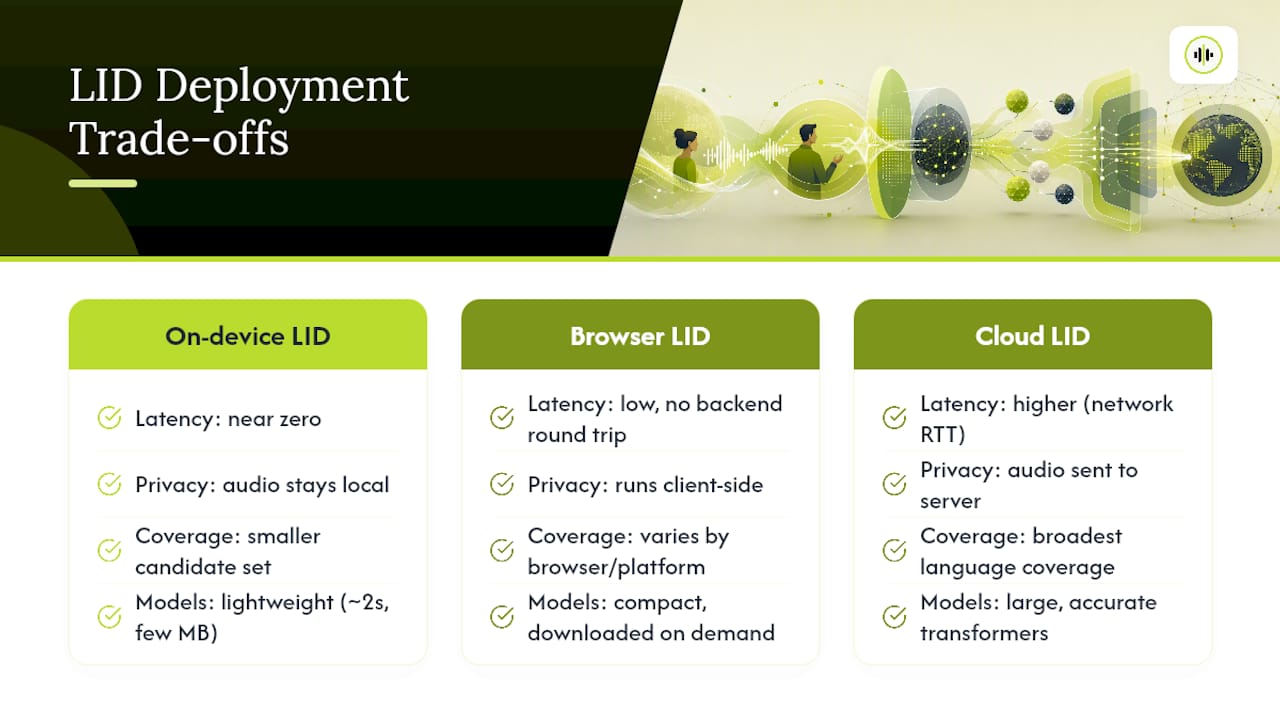
Deployment location changes your latency, privacy posture, and language coverage all at once, and there’s no universally correct answer.
On-device LID keeps audio local, which matters for privacy-sensitive applications and cuts round-trip latency to near zero. Lightweight engines can classify language in roughly two seconds using only a few megabytes of memory, making this viable for mobile and embedded contexts. The trade-off is a smaller candidate language set and less headroom for the kind of large transformer models that perform best on accented or noisy speech.
Browser-based LID downloads a compact model to the client on demand and runs detection without sending audio to a server. Chrome’s built-in LanguageDetector API returns ranked candidate languages with confidence scores this way, giving web developers a privacy-first option with no backend round trip. The catch is UX: that model download has to be handled gracefully, and availability still varies across browsers and mobile platforms.
Cloud-based LID offers the broadest language coverage and the largest, most accurate models, since you’re not constrained by a device’s CPU or memory budget. You pay for that with network latency and a recurring per-request cost, and you’re sending audio off the client, which some compliance requirements rule out entirely.
Many production systems land on a hybrid pattern: run a fast local or browser-based detect for the common case, and fall back to a cloud call when confidence is low or the candidate language falls outside the on-device model’s coverage. That combination usually beats committing fully to one deployment mode.
How Accurate Is Language Detection, and How Do You Benchmark It?
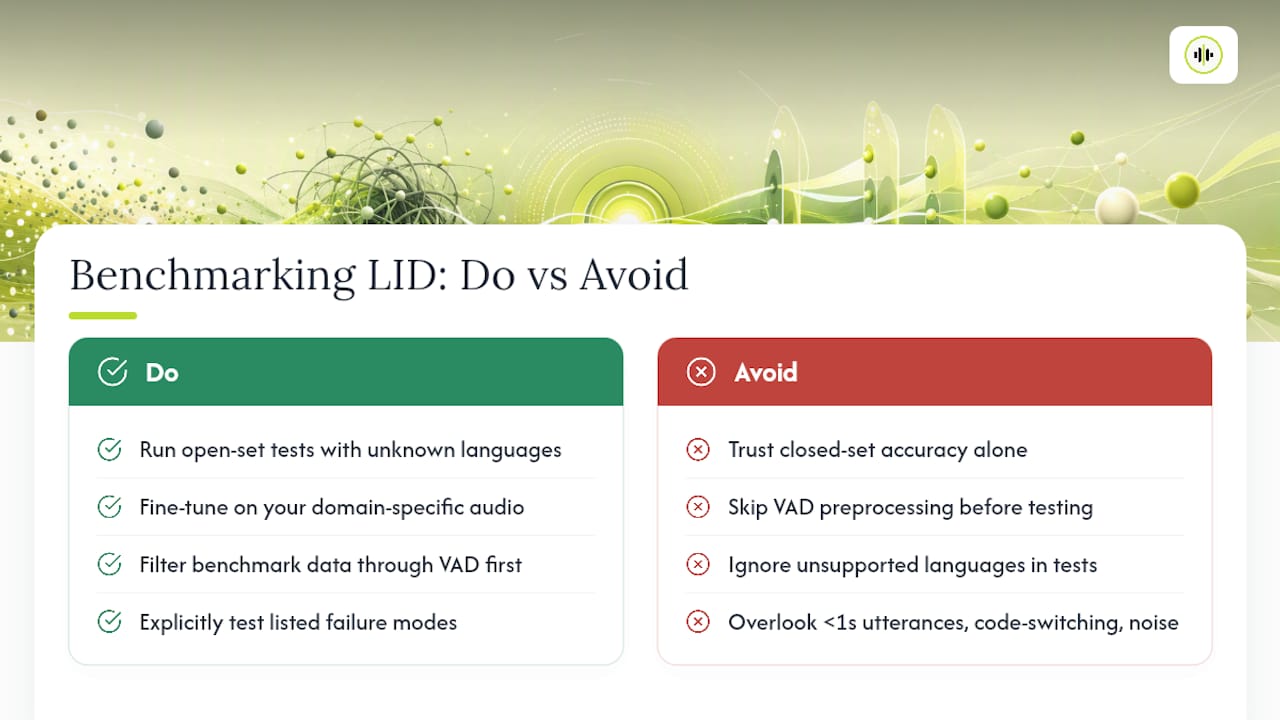
Modern spoken LID models can reach high accuracy in controlled, closed-set tests, but that number tells you almost nothing about production performance unless the evaluation includes languages the model was never trained to recognize. Open-set testing, where you deliberately feed the classifier audio in unsupported languages, is what reveals whether it correctly flags “unknown” or silently forces a wrong match. Systems that always pick the closest label under uncertainty look accurate in a demo and misroute audio quietly in production.
For training and benchmarking data, corpora like VoxLingua107 cover over 100 languages and remain a standard reference point, though fine-tuning on your own domain-specific audio closes most of the gap between generic benchmark performance and your actual call center or podcast audio. Filter that benchmark data through VAD before testing, or your accuracy numbers will reflect silence-handling as much as language classification.
The failure modes worth testing for explicitly: utterances under one second, code-switching within a single sentence rather than between segments, heavy background noise, and dialect-versus-locale mismatches where a model trained on European Portuguese underperforms on Brazilian Portuguese despite both sharing a base language code.
A Practical Checklist for Adding LID to Your Speech Pipeline
Shipping language detection reliably comes down to sequencing these steps correctly rather than any single clever model choice.
- Preprocess the audio. Run VAD to strip silence and non-speech, normalize to 16 kHz or higher, and select the correct channel if your input has multiple speaker tracks.
- Choose detection mode. Pick at-start for single-language sessions or continuous for streams where speakers may switch, and configure your candidate language list using BCP-47 codes without duplicating locales unnecessarily.
- Run detection on a short window. Two to five seconds is a reasonable default; shorter windows favor speed, longer windows favor accuracy on ambiguous accents.
- Evaluate the confidence score against a threshold. Route high-confidence results directly to the matching STT or translation model; route low-confidence or “unknown” results to a fallback path, whether that’s a multilingual model, a retry, or a user prompt.
- Log detection outcomes and re-benchmark periodically. Confidence distributions drift as your real-world audio mix changes, and a quarterly review against a held-out test set catches degradation before users notice it.
Pro Tip: Build your fallback path before you need it. Teams that skip step 4’s “unknown” branch almost always end up hardcoding a default language weeks later, which quietly breaks the exact users the LID layer was supposed to serve.
Matching OpenTranscription to These Implementation Needs
Building and maintaining your own LID-plus-STT routing layer means evaluating model accuracy, latency, and cost across every candidate engine yourself, then re-running that evaluation every time a new model ships. OpenTranscription’s API gives developers a single integration point that sidesteps most of that repeated work.
- Unified access to multiple transcription models lets you compare accuracy and latency for your specific target languages without standing up separate integrations for each provider.
- Support for real-time streaming, speaker diarization, and 105-plus languages covers both the at-start and continuous detection patterns discussed above.
- Word-level timestamps and confidence scores on transcripts provide low-confidence signals useful for downstream processing, aligning with the guide’s recommendations.
- Transparent per-second billing without subscription commitments makes benchmarking on-device versus cloud decisions practical using real cost data.
For a team weighing whether to build a custom LID router or lean on an existing benchmarking layer, that combination removes a meaningful chunk of the evaluation overhead described throughout this guide.
What Teams Get Wrong When Shipping Language Detection
Most teams over-invest in continuous LID before they’ve even validated at-start detection against their real audio. That’s backwards. Start with a short-window at-start detect and VAD, measure your actual unknown-rate and per-language accuracy, and only add the complexity of continuous re-detection once you have evidence that your users genuinely switch languages mid-session.
The bigger blind spot is treating “unknown” as a failure state to eliminate rather than a signal to route on. A model that never returns “unknown” isn’t more accurate. It’s forcing guesses on audio it can’t classify, and that behavior is far more expensive to debug once it’s buried three steps downstream in a mistranslated transcript. Budget engineering time for the fallback path before the happy path, not after.
On-device models earn their complexity only when privacy or connectivity constraints demand it. For most web and mobile apps, a cloud call with a well-tuned confidence threshold outperforms a smaller on-device model on every axis that isn’t raw latency.
— Benjamin
Test Your Language Detection Pipeline Against Real Models
Reading benchmark numbers from a vendor’s documentation and validating them against your own audio are two different exercises, and the gap between them is usually where routing bugs hide. OpenTranscription gives you a single API to run that validation directly: send the same audio through multiple STT models, compare their accuracy and latency side by side, and pick the engine that actually performs best on your target languages instead of the one with the best marketing page.
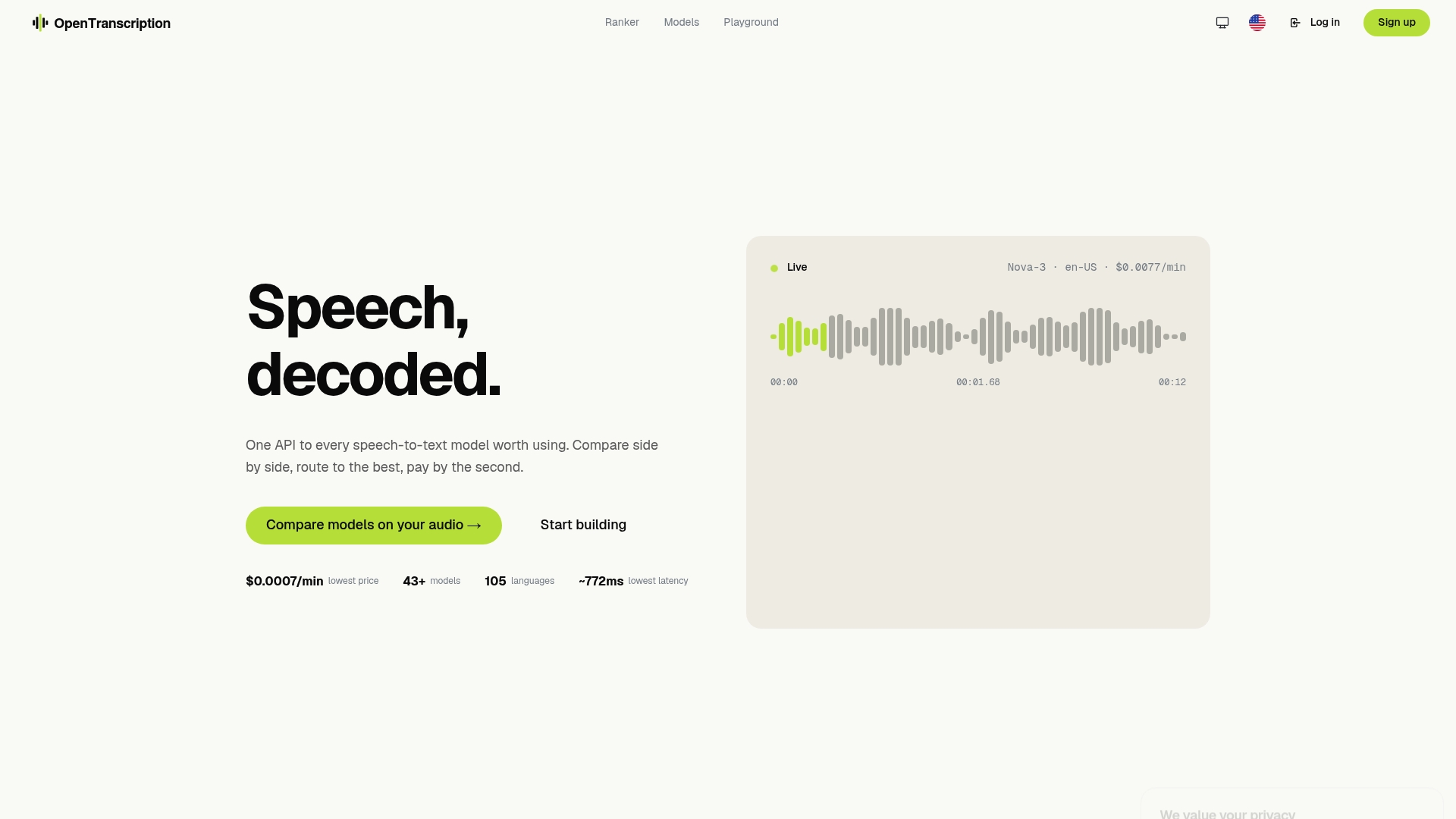
Every model in the transcription models catalog lists its supported languages up front, so you can match your LID candidate list against real coverage before you commit to an integration. The model ranking tool then lets you sort by accuracy, latency, and cost for your specific use case rather than relying on a generic leaderboard. Billing runs per second of audio processed, with no subscription lock-in, so a benchmarking run costs only what it processes. Start a comparison run on OpenTranscription to see how your candidate languages perform across the current model lineup.
Sources
- Language identification (PyTorch blog)
- Spoken language identification research (arXiv)
- Using Translator and Language Detector APIs (MDN)
FAQ
What Is Language Detection in Speech?
Language detection in speech, or spoken language identification, analyzes acoustic features like phonemes and prosody in raw audio to classify which language is being spoken, without needing to transcribe the words first.
Which STT Model Is Best for My Languages?
There’s no single best model across every language and accent; accuracy and latency vary by provider and by target language, which is why benchmarking multiple models against your own audio, as OpenTranscription’s model rankings let you do, tends to produce better results than picking based on a general leaderboard.
How Accurate Is a Language Detector?
Modern LID models often exceed 90% accuracy in constrained, closed-set tests, but real-world accuracy depends heavily on open-set handling, audio quality, and whether the languages in your production traffic matched the model’s training data.
What Is Speech Language Recognition?
Speech language recognition, more precisely called speech language identification, is the process of automatically detecting which language a speaker is using from audio alone, typically returning a language code and a confidence score that downstream systems use for routing.
How Do I Handle Code-Switching Within a Sentence?
Code-switching within a single sentence is one of the harder failure modes for LID; continuous detection with short evaluation windows catches some cases, but very tight switches often require a downstream multilingual STT model rather than relying on detection alone to separate them.