

Cut Transcription Costs by a Third: Volume Driven Playbook for Teams
The fastest way to optimize transcription costs is to route work by risk tier, strip dead air before billing starts, and batch whatever doesn’t need real-time output. AI transcription runs roughly $0.05 to $0.25 per minute versus $1.00 to $3.00 for human transcription, and silence removal plus batching typically cut billable minutes by a third or more before you even touch model selection. Measure your monthly minute volume first, then pilot these three levers on a small sample before scaling.
TL;DR:
- Routing low-stakes audio to lower-cost models and batching non-urgent tasks can reduce transcription expenses by up to 50 percent or more.
- Implementing silence removal and batching before selecting the AI model can significantly lower billable minutes without complex infrastructure changes.
- Self-hosted solutions only become cost-effective at processing more than a few hundred hours monthly, given the high fixed infrastructure costs and maintenance efforts.
- Accurate cost calculations must include review labor, storage, retention, and downstream processing, often exceeding the base API expenses.
- Benchmarking multiple speech-to-text models and dynamically routing jobs ensures the most cost-efficient and accurate transcription for varied audio use cases.
Table of Contents
- The 8 Tactics That Cut Transcription Spend the Most
- Does Recording Quality Actually Affect Transcription Price?
- How Do You Pick the Cheapest Model That Still Meets Your Accuracy Bar?
- Is Self-Hosting Transcription Cheaper Than a Managed API?
- How Do You Calculate Your True Cost Per Minute?
- Why a Benchmarked, Model-Routing API Keeps Costs Down at Scale
- What Does Cost Optimization Look Like at Different Volumes?
- Sequencing Your Cost Optimization Rollout
- Try Model Routing Before You Commit to One Vendor
- Sources
- FAQ
The 8 Tactics That Cut Transcription Spend the Most
Working through them in order of impact keeps engineering effort proportional to savings.
- Silence removal (VAD). Voice activity detection strips dead air, hold music, and non-speech segments before the audio ever reaches a billing meter. Most calls and meetings carry 15% to 40% silence, and cutting it directly reduces the minutes you pay for.
- Batch over streaming. Real-time transcription costs more because it demands dedicated compute and lower latency tolerances. Batch processing is typically 30% to 50% cheaper than streaming, so anything that doesn’t need a live transcript (compliance archives, research interviews, podcast backlogs) belongs in a batch queue.
- Route by content risk. Send bulk, low-stakes audio to cheaper models and reserve premium models or human review for legal, medical, or customer-facing transcripts.
- Hybrid AI-plus-human review. Let AI handle the first pass on everything, then route only flagged segments (low confidence scores, crosstalk, technical jargon) to human editors. A 90/10 split between AI and human review hours is a common starting point.
- Trim downstream output. If transcripts feed into an LLM for summarization or search indexing, verbose formatting and redundant metadata inflate token costs on top of transcription fees.
- Autoscale compute instead of running always-on servers. Spot instances and scale-to-zero policies matter most for self-hosted pipelines, where idle GPU time is pure waste.
- Negotiate volume commitments. Providers routinely discount prepaid blocks once annual minutes cross a meaningful threshold.
- Audit line items monthly. Diarization, extended retention, and export formatting often appear as separate charges that quietly raise your effective per-minute rate.
Pro Tip: Run VAD and batching together before you touch model selection. Fixing the input pipeline usually saves more than switching vendors, and it’s a one-time engineering cost rather than a recurring negotiation.
Does Recording Quality Actually Affect Transcription Price?
Yes, and the effect compounds. Poor audio forces more words into the “low confidence” bucket, which means more human review minutes, more re-recording requests, and more time spent correcting names and technical terms that a clean recording would have caught the first time.
A few habits fix most of the damage before it happens:
- Use close-mic placement (within 6 to 12 inches) instead of relying on laptop or room mics.
- Record in a quiet space, and where budget allows, add basic foam panels or a $20 pop filter to cut plosives and echo.
- Enable push-to-talk or mute-when-not-speaking in group calls to eliminate overlapping speech and dead air at the source.
- Normalize audio levels and trim silence before upload rather than after, so preprocessing tools do the work a paid API would otherwise bill for.
- Record speakers on separate mono channels when possible. Diarization on a clean multi-channel file is faster and cheaper to process than speaker separation on a single muddy stereo track.
None of this requires an audio engineer. Free tools like Audacity or FFmpeg scripts handle trimming and normalization in minutes, and teams focused on live meetings often see faster gains from basic pronunciation and communication training than from any software purchase, since clearer speech reduces the ambiguous segments that drive up review time.
How Do You Pick the Cheapest Model That Still Meets Your Accuracy Bar?
Model selection comes down to four questions: how clean is the audio, how much speaker overlap exists, what’s the regulatory exposure if something gets mistranscribed, and how much latency can you tolerate? Answer those honestly before comparing per-minute rates, because the cheapest model on paper often costs more once you add review labor for a use case it wasn’t built for.
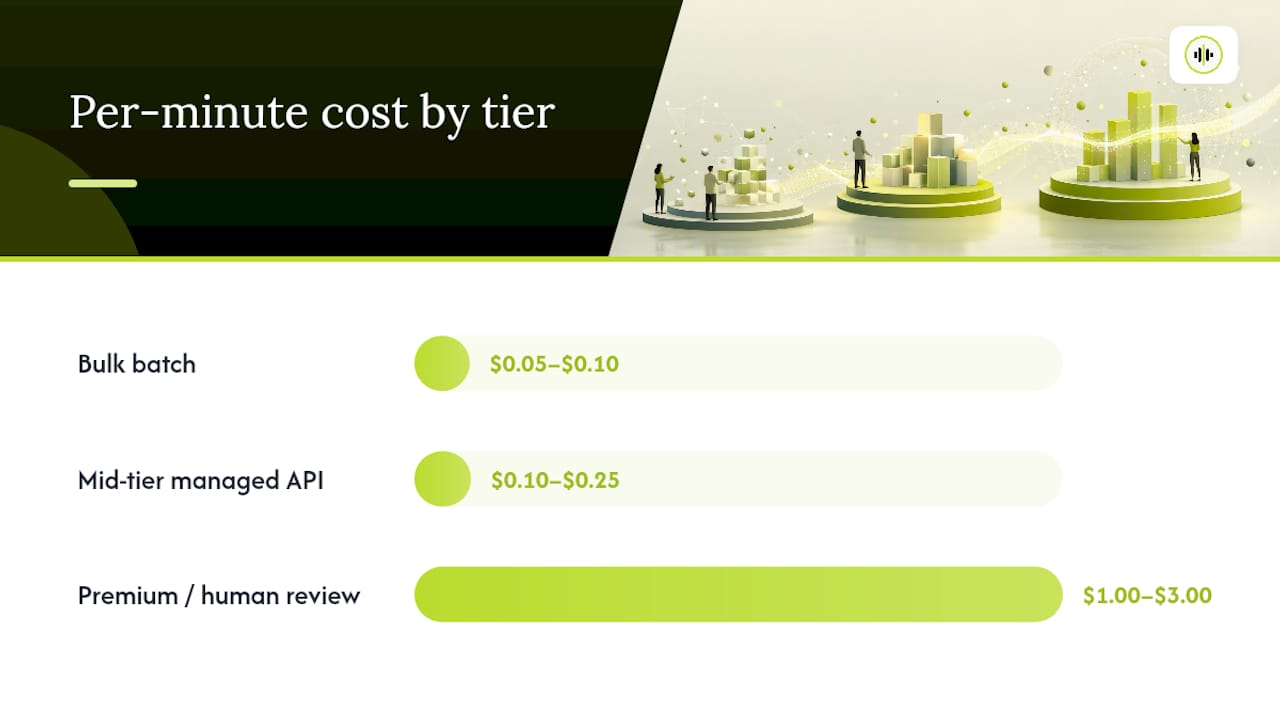
A three-tier routing plan handles most organizational volume without over-provisioning:
| Tier | Typical use case | Cost per minute | Add-on risks |
|---|---|---|---|
| Bulk batch | Internal notes, research archives, backlog processing | $0.05–$0.10 | Diarization, extended retention |
| Mid-tier managed API | Customer calls, meeting transcripts, podcasts | $0.10–$0.25 | Real-time surcharge, export formatting |
| Premium / human review | Legal, medical, regulatory, investor-facing content | $1.00–$3.00 | Turnaround-time premiums, certified accuracy |
Add-ons like diarization and redaction can raise the effective rate well above the base quote, so always ask for the fully loaded price before committing volume to a single provider.
Pro Tip: If your monthly volume regularly exceeds a few thousand hours, that’s the point to start evaluating enterprise contracts or self-hosted infrastructure. Below that, the API markup is almost always cheaper than the engineering time it would take to replace it.
Is Self-Hosting Transcription Cheaper Than a Managed API?
For most organizations, no. The break-even point sits somewhere in the low hundreds of hours of audio per month, and it moves depending on how much engineering time you’re willing to spend maintaining infrastructure.
Self-hosting means owning fixed costs: GPU instances, orchestration, monitoring, and the engineering hours to keep all of it running. In exchange, a well-tuned pipeline can go remarkably low. One documented build using AWS spot instances, VAD, and Whisper Large-v3 Turbo pushed processing costs below $0.10 per hour of audio, largely by combining several engineering levers at once rather than optimizing one at a time.
The levers that matter most for self-hosted cost control:
- Spot instances for non-urgent batch jobs, since interruptible compute runs a fraction of on-demand pricing.
- VAD preprocessing to avoid paying GPU time for silence.
- Quantization (int8 or float16) to shrink model size and speed up inference without a meaningful accuracy hit for most use cases.
- Autoscaling with scale-to-zero so idle periods don’t burn budget overnight.
Managed APIs still win when volume is low, when you need contractual uptime guarantees, or when there’s no internal ops team to own the pipeline. Building your own infrastructure to process a few hundred hours a month rarely pays back the engineering investment inside a reasonable timeframe.
How Do You Calculate Your True Cost Per Minute?
Your published per-minute rate is never your real cost. The true number includes diarization fees, storage and retention charges, review labor, and whatever downstream processing (like LLM summarization) runs on top of the transcript. Storage and processing choices made after transcription often account for more of the total bill than the base API fee itself.
A working calculator needs six inputs:
- Annual minutes of audio processed.
- Base transcription rate per minute.
- Add-on fees (diarization, redaction, extended retention).
- Storage and export costs.
- Review labor: hours spent and the reviewer’s hourly rate.
- Downstream LLM processing cost per transcript, if applicable.
Consider a 10-person team currently paying for manual transcription. Switching to an AI-first hybrid workflow, where AI handles the first pass and staff review only flagged segments, has been shown to save that size of team roughly $18,000 to $37,000 a year in labor once you account for the reduced review hours. Run a sensitivity check by flexing review labor rate and add-on fees first. Those two inputs usually swing the total more than the base per-minute price does, which matters when you’re building a case for a fixed-price commitment versus a pay-as-you-go structure with overage risk.
Why a Benchmarked, Model-Routing API Keeps Costs Down at Scale
Most transcription spend gets wasted on a single decision: locking into one provider for every workload, regardless of whether that provider is the cheapest or most accurate option for the job at hand. OpenTranscription addresses this by benchmarking dozens of speech-to-text models side by side on cost, speed, and accuracy, then letting you route each job to whichever model fits its risk tier.
That routing model matters because bulk, low-stakes audio and regulatory-sensitive audio have almost nothing in common in terms of what they need from a transcription engine, yet most single-vendor contracts price them identically.
- Access to 40+ transcription models through one unified API, instead of separate integrations per provider.
- Real-time streaming and speaker diarization available as needed, rather than paying for both by default.
- Structured transcripts with word-level timestamps and confidence scores to aid low-confidence segment review.
- Support for a broad range of languages and flexible audio formats, useful for teams with mixed international audio sources.
- Transparent, pay-as-you-go billing with no subscription commitment, suitable for developers building pipelines and ops teams scaling volume without long-term vendor commitments.
What Does Cost Optimization Look Like at Different Volumes?
The right playbook changes sharply depending on how many minutes you’re processing a month, and the mistake most teams make is applying an enterprise strategy to a startup’s volume, or vice versa.
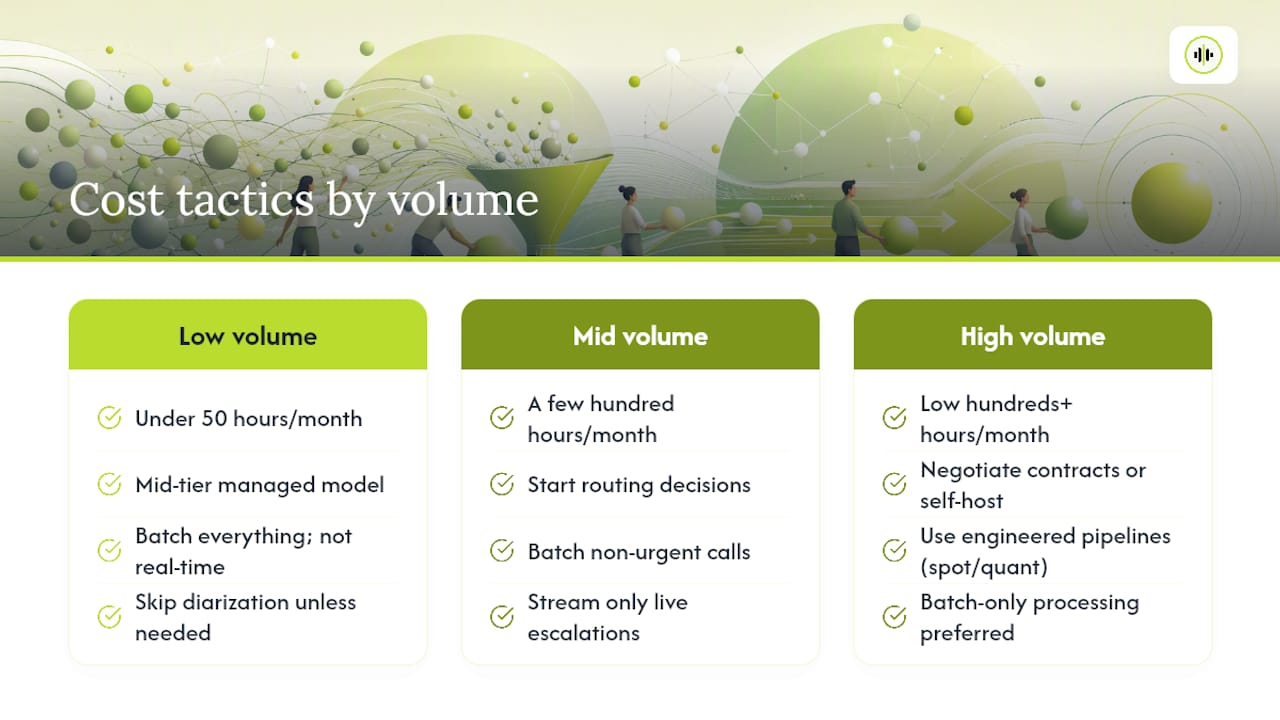
Low volume (under 50 hours a month). A solo researcher or small content team rarely benefits from engineering investment. The right move is picking a mid-tier managed model, batching everything since nothing needs to be real-time, and skipping diarization unless multiple speakers are genuinely present. At this scale, silence removal alone can cut the bill by a third with zero infrastructure work.
Mid volume (a few hundred hours a month). This is where routing starts to pay off. Batching non-urgent calls and streaming only live escalations typically trims the bill without sacrificing the accuracy that matters for disputed calls.
High volume (low hundreds of hours or more monthly). Here the calculation shifts toward negotiated contracts or self-hosted infrastructure, since engineered pipelines using spot instances and quantization can push unit costs well below standard managed-API rates. A media company processing thousands of hours of podcast backlog, for instance, gains more from prepaid volume discounts and batch-only processing than from any single model swap.
Sequencing Your Cost Optimization Rollout
Measure before you optimize. Pull three months of billing line items and separate them by category (base rate, diarization, storage, streaming surcharges) before touching a single tactic. Most teams skip this step and end up negotiating the wrong contract term.
Pilot on a two-week sample once you know where the money actually goes. Test VAD and batching against your current baseline on real audio, not a demo dataset, since silence percentages vary wildly between customer calls, meetings, and interviews.
Scale only after the pilot holds up under your actual review workload. The most common pitfall is declaring victory on transcription accuracy while ignoring a spike in review hours that quietly erases the savings. Keep billing instrumentation running continuously after rollout, not just during the pilot, and sample transcript quality monthly rather than trusting a one-time accuracy score.
— Benjamin
Try Model Routing Before You Commit to One Vendor
This platform benchmarks dozens of transcription models on the same audio and routes each job to whichever one fits your target cost, speed, or accuracy, helping avoid paying premium rates for bulk work that may not require it.
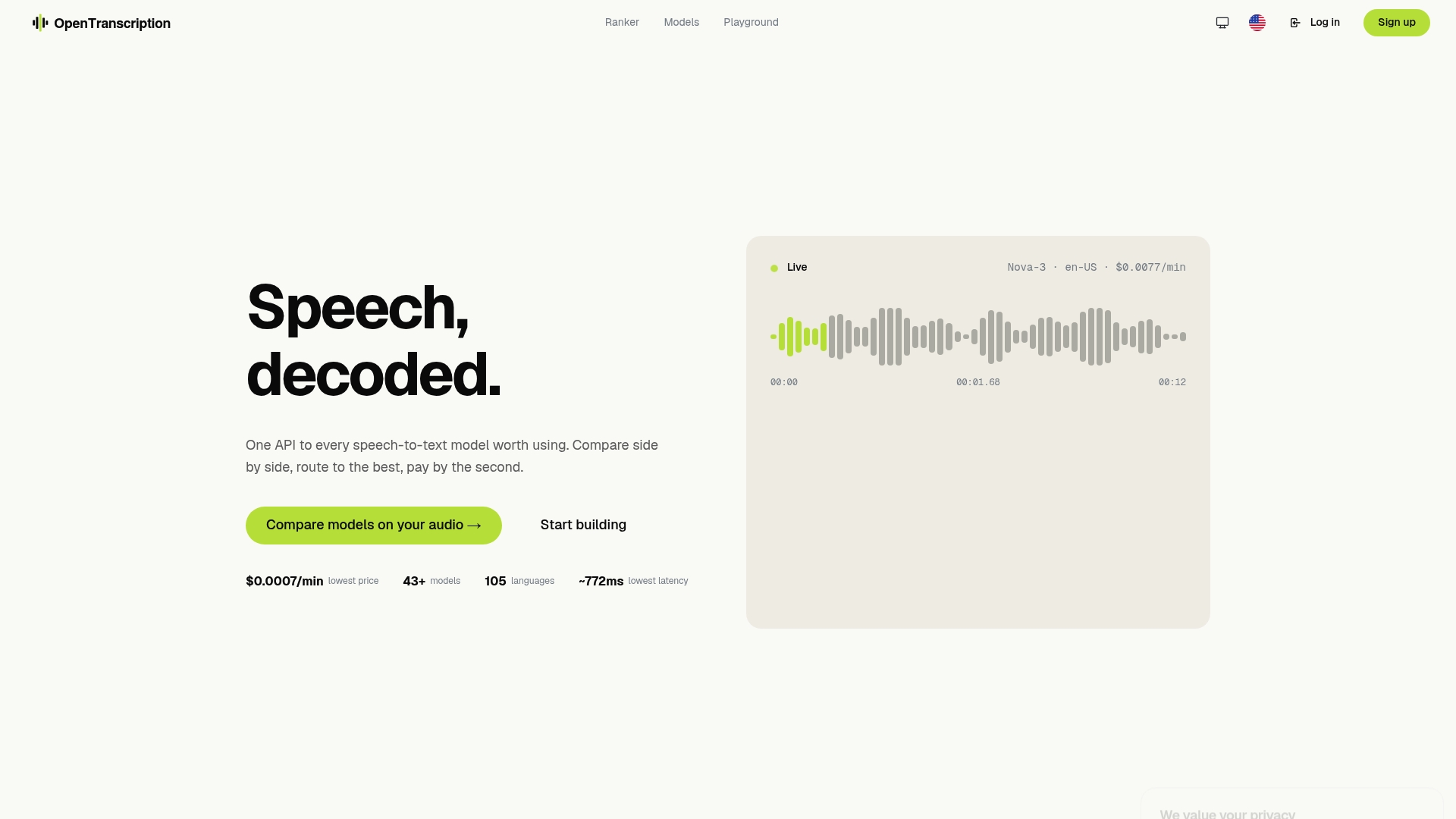
Getting started doesn’t require a contract. Run a small batch through the pay-as-you-go API and compare the routed cost against what you’re paying today, or check the model catalog if you need to confirm a specific model supports diarization or your target language before committing volume. Teams handling live customer calls can also review the real-time model rankings to find the fastest option that still meets accuracy thresholds. There’s no subscription to cancel and no minimum commitment. You pay for what you process, and you can adjust routing rules the moment your volume or quality needs change. For high-volume operations, the Enterprise plan adds custom deployment and invoicing once your monthly minutes justify a negotiated arrangement.
Sources
- AI Transcription ROI: How Businesses Actually Save Time and Money with Speech-to-Text (2026 Data) - DEV Community
- Speech-to-Text API Pricing Compared - 2026 | Awesome Agents
FAQ
What Is the Cheapest Transcription Service?
There’s no single cheapest option across every use case. Bulk AI models run roughly $0.05 to $0.25 per minute, and a routed platform like OpenTranscription lets you pick the lowest-cost model that still meets your accuracy requirement for each specific job.
Is Transcribing Worth It as a Side Hustle?
Manual transcription work still pays, but the per-job rate has compressed as AI-first review has become standard. It works best as a side hustle when you specialize in a niche AI struggles with, like heavy accents, multiple overlapping speakers, or highly technical audio.
How Long Should It Take to Transcribe 30 Minutes of Audio?
An AI model typically returns a draft transcript for 30 minutes of clean audio in a few minutes. Human review or correction on top of that draft usually takes 30 to 90 minutes depending on audio quality and speaker count.
What Is the Best Free Transcribe App?
Free tiers exist across most transcription platforms, but they usually cap monthly minutes or limit features like diarization and export formats. For ongoing use beyond a small personal volume, a pay-as-you-go model with no subscription, like OpenTranscription’s pricing structure, tends to cost less than stacking multiple free-tier accounts.
Does Batch Processing Really Save Money Over Streaming?
Yes. Batch transcription is typically 30% to 50% cheaper than streaming because it doesn’t require the dedicated low-latency compute that real-time transcription demands.