

Long Audio Transcription That Scales: Chunking, 20–30s Tests, AI First Review
For long recordings, the fastest reliable method is AI-first batch transcription, whether cloud-based or local, followed by a short, focused human review pass. Expect broad format support (MP3, WAV, M4A, FLAC), multi-hour files handled through chunking, and accuracy that depends heavily on audio quality. Before committing to a full batch job, test a 20 to 30 second sample with your chosen tool to confirm settings work before you scale up.
TL;DR:
- Using AI-first batch transcription with prior sample testing ensures reliable results for multi-hour recordings, especially when audio quality is high.
- Cloud services dominate long audio transcription due to speed and scalability, while local or human methods are preferred for confidential or high-stakes recordings.
- Audio format, microphone quality, and preprocessing steps like normalization and noise reduction significantly affect transcription accuracy.
- Processing time varies with file length and complexity; chunking and parallel processing are essential for efficiency and timely results.
- Human review should focus on speaker attribution, proper nouns, figures, and low-confidence regions for effective editing rather than rewriting entire transcripts.
Table of Contents
- Long Audio Transcription Methods: Local, Cloud, or Human?
- How Should You Prepare Long Audio Before Transcribing It?
- How Long Does It Take to Transcribe Long Audio Files?
- What Accuracy Should You Expect, and How Do You Review It Efficiently?
- Which Export Format Should You Use for a Long Transcript?
- What Does Long Audio Transcription Actually Cost?
- Why an API-First Platform Handles Long Audio Better
- A Practical Checklist Before You Transcribe Your Next Long Recording
- Getting Started With an API-Based Approach to Long Recordings
- Sources
- FAQ
Long Audio Transcription Methods: Local, Cloud, or Human?
The right method for transcribing a three-hour interview is rarely the same as the right method for a confidential legal deposition. Three approaches dominate long audio transcription today, and each solves a different problem.
Local or offline models run on your own hardware. Nothing leaves your machine, which matters for legal, medical, or corporate recordings where confidentiality is non-negotiable. The trade-off is fixed cost: you need adequate compute (a decent GPU speeds things up considerably), and you’re responsible for updates, model selection, and troubleshooting. For a researcher transcribing a single archive of sensitive interviews, this often beats sending files to a third party.
Cloud API and batch services handle the majority of long-form transcription work today, and for good reason. These platforms manage preprocessing, scale to handle multiple concurrent files, and typically process a one-hour recording in a fraction of that time. An AI-first workflow where a model generates a full draft that a human then refines has become the practical standard for podcasts, interviews, and lecture archives, replacing the old model of transcribing everything by ear from scratch.
Human transcription remains the fallback when the stakes are highest: courtroom testimony, medical dictation requiring exact terminology, or any output going to publication without a second editorial pass. It costs more and takes longer, but a trained transcriber catches context AI still misses, particularly with heavy accents, crosstalk, or specialized jargon.
Matching the method to the use case avoids both over-engineering and under-delivering:
- Podcast episodes: cloud batch transcription with light human cleanup for show notes and captions.
- Academic lectures: cloud or local AI transcription, since terminology consistency matters more than verbatim accuracy.
- One-on-one interviews: AI-first draft with full human review, especially when quotes will be published.
- Research archives (multi-hour, multi-file): batch cloud processing prioritized for cost and speed, with spot-check human review rather than full proofreading.
- Legal or medical recordings: local processing or a dedicated human transcription service, depending on jurisdictional confidentiality requirements.
The pattern holds across nearly every use case: AI handles the bulk transcription, and humans handle judgment calls the model can’t make on its own.
How Should You Prepare Long Audio Before Transcribing It?
Audio quality determines transcription accuracy more than any other single factor, and most of the damage happens before the file ever reaches a transcription tool.
Format matters more than people expect. WAV and FLAC preserve the full audio signal and produce the most reliable transcripts. MP3 or M4A at 128kbps or higher is acceptable for most spoken-word content. The real problem is low-bitrate MP3, commonly encoded at 64kbps, which strips out high-frequency information the model needs to distinguish similar-sounding consonants. That single encoding choice can measurably increase transcription errors before you’ve even started the job.
Microphone placement and signal-to-noise ratio (SNR) matter just as much. A lecture recorded from a phone in the back row of a hall will produce a noticeably worse transcript than the same lecture recorded from a lapel mic. Aim for a signal-to-noise ratio that clearly distinguishes speech from background noise. If you’re not sure what that looks like in practice, record a short test clip and listen for how clearly a voice stands out against background hum, HVAC noise, or room echo.
A few preprocessing steps, run before the file goes into any transcription pipeline, save hours of correction later:
- Normalize audio levels so volume stays consistent across the entire recording.
- Trim dead silence at the start and end, and any long unusable stretches in the middle.
- Apply light noise reduction, using a tool built for the job rather than aggressive filtering that can distort speech. Guides on audio processing for professionals cover the basic enhancement techniques worth knowing.
- Flag or split unusable segments, such as sections with heavy crosstalk or equipment failure, for manual review rather than forcing them through automated processing.
Pro Tip: Before you commit a three-hour file to batch processing, run a 20 to 30 second clip from the noisiest section through your transcription tool first. If that segment comes back clean, the rest of the file almost certainly will too, and you’ve avoided wasting processing time and money on a bad recording.
How Long Does It Take to Transcribe Long Audio Files?
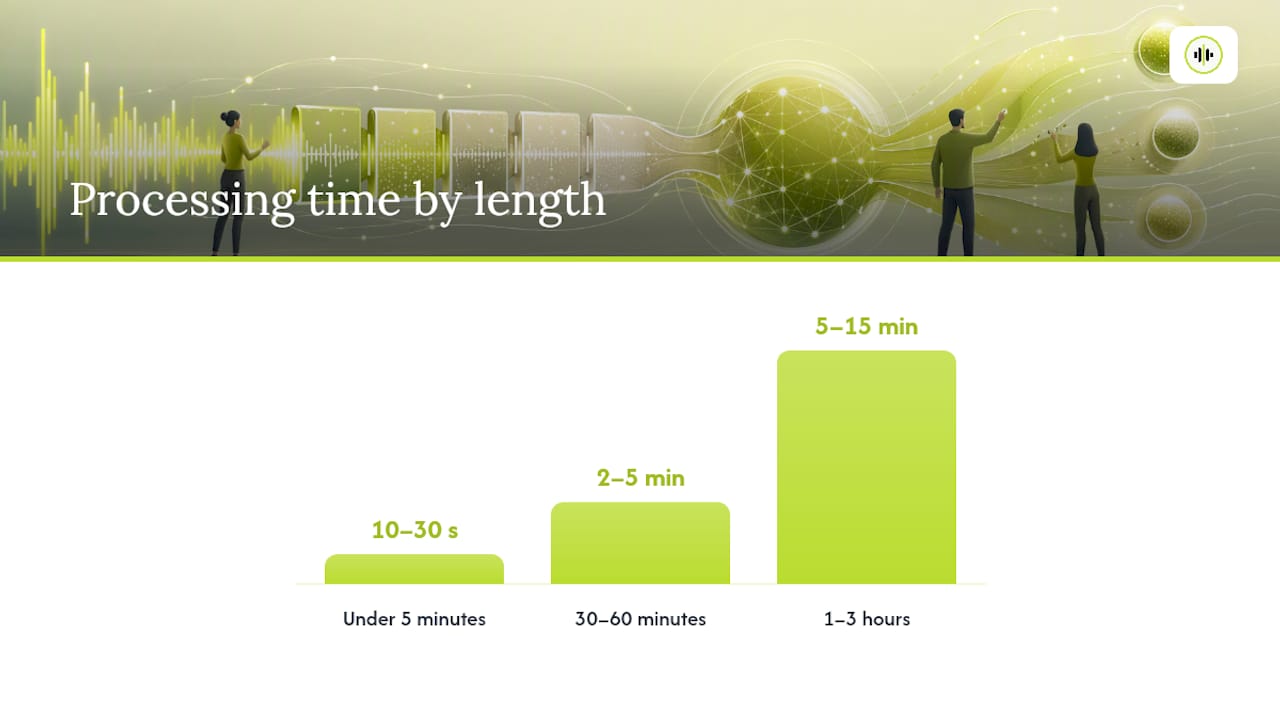
Processing time scales with file length, but not in a strictly linear way. Most services report rough benchmarks that hold up well in practice: files under five minutes often complete in 10 to 30 seconds, a 30 to 60 minute recording typically takes 2 to 5 minutes, and a 1 to 3 hour file usually finishes in 5 to 15 minutes, depending on the service and settings chosen.
Several factors slow jobs down beyond raw length. High sample rates increase processing overhead without necessarily improving accuracy. Files with many speakers require more computation for diarization. Background noise forces the model to work harder to separate speech from everything else.
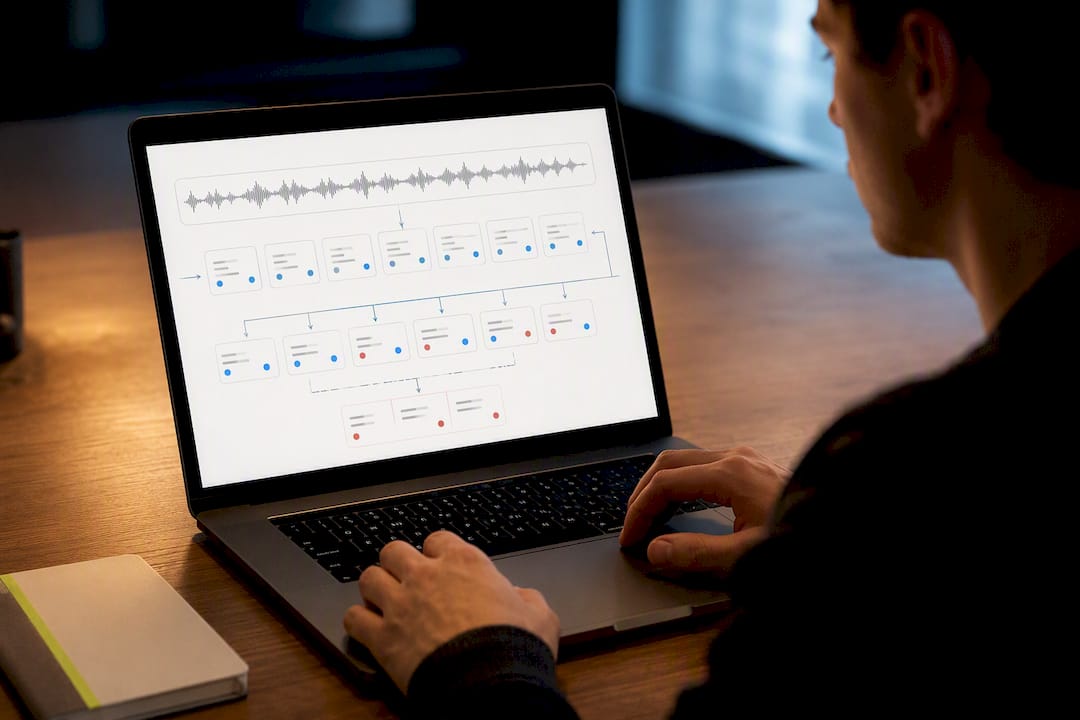
Long files almost always get broken into smaller pieces before processing, a technique called chunking. Overlapping the chunks, commonly 30-second segments with a 3-second overlap, prevents words from being cut off or lost at the boundary between segments. This is standard engineering practice across long-file transcription pipelines, not an optional refinement.
A few practical points affect throughput on real jobs:
- Upload files while earlier chunks are still processing rather than waiting for the full job to queue sequentially.
- Parallelize wherever the platform supports it, since running chunks concurrently cuts wall-clock time significantly on multi-hour files.
- Check how the platform reports progress. Some show per-chunk status, which lets you catch a failed segment early instead of discovering it after the full file finishes.
- Confirm how the tool reassembles the final transcript. Time-synced output should stitch chunks back together with continuous timestamps, not reset the clock at each segment boundary.
What Accuracy Should You Expect, and How Do You Review It Efficiently?
Accuracy on long audio transcription depends almost entirely on recording conditions, not on the transcription tool alone. Clean, single-speaker studio audio can reach mid-to-high 90s percent accuracy. Noisy, multi-speaker recordings with overlapping speech routinely fall to 78 to 90%, depending on signal-to-noise ratio and how much speakers talk over each other.
Accuracy on real-world, noisy multi-speaker recordings can run 10 to 20 percentage points below the mid-90s figures achieved on clean, single-speaker studio audio.
That gap is exactly why an efficient review workflow matters more than chasing a marginally more accurate model. Rather than reading every line of a three-hour transcript, prioritize corrections in four areas:
- Speaker attribution. Diarization errors compound quickly in group discussions, and misattributed lines undermine the entire transcript’s usefulness.
- Proper nouns and technical terms. Names, brand terms, and jargon are where models guess wrong most often, especially in specialized lectures or interviews.
- Numbers, dates, and figures. These errors are easy to miss on a skim and costly if they end up in a published document or a research citation.
- Low-confidence regions. Most transcription tools flag segments where the model wasn’t sure, and those flags are the highest-value places to spend review time.
A practical review sequence looks like this: first, skim the transcript for confidence-score drops or obvious gaps, since these cluster around noisy sections rather than spreading evenly. Second, make targeted corrections in those specific regions instead of proofreading line by line. Third, verify speaker labels and timestamps align with what you actually hear, particularly at chunk boundaries. Fourth, do a final export check to confirm formatting held up after edits.
Combining an AI-first draft with targeted human proofreading is now standard practice for anything headed toward publication, whether that’s a legal filing, a medical record, or a podcast transcript posted alongside the episode. The point isn’t to re-transcribe the file by ear. It’s to spend your limited review time exactly where the confidence scores say the model struggled.
Which Export Format Should You Use for a Long Transcript?
The right export format depends entirely on what happens to the transcript next, and most long-audio projects end up needing more than one.
SRT and VTT files work for video captioning and subtitle workflows, where timing precision matters and frame length needs to stay within readable limits. DOCX and TXT suit editing pipelines, show notes, or any document a human will read and revise directly. JSON output supports indexing, search, and downstream analysis, particularly useful when you’re building a searchable archive out of dozens of hours of interviews or lecture recordings. Most established transcription tools support this full range of formats, often alongside built-in speaker diarization and AI-generated summaries.
Post-processing rarely ends at export. A few steps consistently improve the final product:
- Paragraphing long, unbroken transcript blocks into readable sections based on topic shifts or speaker changes.
- Redaction of sensitive information, names, account numbers, or anything that shouldn’t appear in a public-facing version.
- Timestamp cleanup, especially after manual edits that may have shifted text without updating time codes.
- Subtitle frame length checks, confirming no caption line runs too long to read comfortably on screen.
Once exported, transcripts stop being a one-time deliverable and become a searchable asset: automated summaries and keyword extraction turn a three-hour interview into something you can query in seconds instead of re-listening to find one quote.
What Does Long Audio Transcription Actually Cost?
Pricing models vary more than most first-time buyers expect, and the difference matters a lot once you’re transcribing dozens of hours a month rather than one file.
Three structures dominate the market: per-second or per-minute billing, monthly minute allowances, and flat pay-as-you-go pricing. Per-second billing tends to favor irregular workloads, since you’re not paying for unused capacity between projects. Monthly plans make more sense for teams with predictable, recurring volume.
Watch for free-tier and per-file limits, since some platforms cap individual files at a set length or size, which can force you to split a long recording just to fit within a plan’s constraints. That’s an avoidable cost if you check limits before starting a batch job.
A few tactics keep long-audio budgets in check:
- Encode source files at reasonable bitrates rather than lossless formats when file size drives cost, since 128kbps is usually sufficient for accuracy.
- Batch archive dumps during off-peak processing windows if your platform offers reduced rates.
- Reserve human review for the sections that actually need it, rather than paying for full manual proofreading on every file.
- Compare per-second rates across models rather than defaulting to whichever tool you used last time.
Why an API-First Platform Handles Long Audio Better
Long-form transcription workflows expose the weaknesses of single-model tools fast: one model handles clean English audio well but falls apart on accented speech, another handles diarization but processes slowly, and pricing rarely aligns with actual usage patterns. An API that gives access to more than 30 transcription models, benchmarked side by side, lets you choose based on what a specific job actually needs rather than settling for whatever one vendor happens to offer.
For long recordings specifically, that flexibility translates directly into cost and accuracy control. A researcher processing hours of multilingual field interviews can select a model optimized for accuracy across 105+ supported languages, while a podcast network batching weekly episodes can prioritize speed and lower per-second cost. Real-time streaming and speaker identification apply across both cases, and structured output with word-level timestamps and confidence scores gives reviewers exactly the flagged regions they need for the targeted review workflow described earlier. Per-second billing means a five-minute test clip costs a fraction of a cent, not a wasted subscription month, which matters when validating settings before committing to a multi-hour batch job.
A Practical Checklist Before You Transcribe Your Next Long Recording
Test a short clip first. Match the format to the job (WAV or FLAC when accuracy is critical, 128kbps+ MP3 otherwise). Chunk long files with overlap. Choose a model based on the languages and speaker count involved, not habit. Review flagged low-confidence regions before anything else. Verify speaker labels and timestamps. Export to the format the next step actually requires. Set a per-second budget before you start, not after.
— Benjamin
Getting Started With an API-Based Approach to Long Recordings
An API-based platform can turn long-audio transcription into a cost-controlled, model-matched process instead of a one-size-fits-all subscription. Some platforms benchmark more than 30 speech-to-text models side by side, allowing selection of a model optimized for accuracy, speed, or cost depending on the audio type. Features such as support for multiple languages, speaker identification, and structured transcripts with confidence scores can support the review workflow described earlier, flagging low-confidence regions and helping with proper nouns and speaker attribution.
Billing may run per second processed without subscription lock-in, so test clips can cost cents and multi-hour batches can scale predictably. Compare models by cost, speed, and accuracy on the transcription models catalog, or head straight to the OpenTranscription platform to run your first file and see how the numbers hold up against whatever tool you’re using now.
Sources
FAQ
How Can I Transcribe One Hour of Audio?
Upload the file to an AI transcription service that supports batch processing, which typically returns a draft in a few minutes depending on the platform and settings. Follow with a focused human review pass targeting flagged low-confidence sections, speaker labels, and proper nouns rather than proofreading the entire transcript line by line.
How Long Does It Take to Transcribe Two Hours of Audio?
Processing time for a file this length usually falls in the 5 to 15 minute range on most cloud transcription services, though heavy background noise, many speakers, or high sample rates can extend that window.
How Can I Transcribe Long Audio to Text for Free?
Some platforms offer limited free tiers, often capped by file length or monthly minutes, which can force you to split a long recording into smaller pieces to stay within the limit. Check the specific cap before starting, since running into it mid-batch wastes both time and processing budget.
Can ChatGPT Do Audio Transcription?
ChatGPT itself is a text-based conversational model, not a dedicated transcription engine, so it isn’t built for processing raw multi-hour audio files directly. Purpose-built transcription platforms, including API services that benchmark dedicated speech-to-text models, handle long recordings far more reliably in terms of speed, diarization, and accuracy.
What Accuracy Can I Expect From Long Audio Transcription?
Clean, single-speaker studio recordings typically reach mid-to-high 90s percent accuracy, while noisy or multi-speaker recordings often fall to 78 to 90% depending on background noise and how much speakers overlap. Prioritizing human review on low-confidence sections, rather than the entire file, is the most efficient way to close that gap.