

Developers: Production gRPC Speech to Text Playbook, 8–16 KB Chunks
Use gRPC streaming when the application needs real-time interim transcripts and the lowest possible end-to-end latency; use REST when the job is short, file-based, or batch recognition where interim updates serve no purpose. gRPC (built on protobuf) supports bidirectional streaming, which REST cannot replicate; OpenTranscription’s own streaming pipeline follows the same protocol constraints. The two rules that trip up most implementations: the first message in a stream must carry configuration only, and each subsequent message has a hard size ceiling, documented at 25 KB per request in the reference implementation most APIs mirror.
TL;DR:
- gRPC streaming requires an initial configuration message with no audio data, and subsequent messages must stay within 25 KB per request to avoid errors.
- Streaming is the only method suitable for real-time, live recognition, as it allows interim results to be sent before the audio finishes.
- Proper audio preprocessing involves demuxing, decoding, resampling to 16 kHz mono, and chunking into 8-16 KB segments, with
ffprobeuseful for validation.- Building a gRPC client requires generating stubs, creating a generator for audio chunks, managing authentication, and handling reconnects and backpressure.
- Common errors like size limits, garbled transcripts, or connection drops can be diagnosed by verifying chunk size, format matching, network stability, and permissions.
Table of Contents
- How Does gRPC Streaming Speech to Text Work?
- What Are the gRPC Protocol Rules for Speech Streaming?
- How Do You Feed RTMP or WebRTC Audio Into a gRPC Endpoint?
- How Do You Implement a gRPC Speech Streaming Client?
- What Does gRPC Streaming Code Actually Look Like?
- How Do You Fix Common gRPC Speech Streaming Errors?
- How Does OpenTranscription Fit Into a gRPC Streaming Pipeline?
- What Are the Right Defaults for Production Streaming?
- Get Started With gRPC Streaming on OpenTranscription
- Sources
- FAQ
How Does gRPC Streaming Speech to Text Work?
Streaming speech recognition works by opening a single bidirectional channel where the client keeps sending audio frames and the server keeps sending back partial results, without either side waiting for the other to finish. That’s the core distinction from REST: a REST call is one request, one response, full stop. A streaming gRPC connection stays open, pushing interim hypotheses as the model refines its guess and locking in a final transcript once it detects an endpoint (a pause, a silence gap, or an explicit stream close).
Two other invocation patterns exist alongside streaming, and picking the wrong one wastes engineering time:
- Synchronous recognize: send a short audio clip, block, get one transcript back. Fine for voicemail-length clips under a minute.
- Asynchronous long-running recognize: submit a file, poll or wait for a callback, get a transcript once processing completes. Built for hour-long recordings, not live audio.
- Bidirectional streaming: the only pattern that supports live captions, voice assistants, and call-center monitoring, because it’s the only one built to hand back results before the audio finishes.
Reach for streaming specifically when a human or downstream system needs to react while someone is still talking.
What Are the gRPC Protocol Rules for Speech Streaming?
The StreamingRecognize RPC is a gRPC-only method. There’s no REST equivalent, because REST’s request-response model can’t express a stream that stays open in both directions at once. The proto definition that most speech APIs pattern their implementation after spells out a strict message order, and violating it throws an immediate error rather than a graceful warning.
The rule that catches nearly every first-time implementer:
- The first
StreamingRecognizeRequestmust contain thestreaming_configfield and nothing else. No audio bytes belong in that first message. - Every message after that must contain only
audio_contentbytes. Sending config twice, or mixing config and audio in one message, breaks the stream. - Audio bytes travel as raw protobuf binary, never base64-encoded, and they must match the sample rate and encoding declared in that initial config exactly, as explained in this detailed speech-to-text implementation guide.
Statistic to remember: the documented per-message limit sits at 25 KB, and exceeding it throws a size error rather than silently truncating the payload. Given that ceiling, target chunk sizes in the 8 to 16 KB range, which leaves headroom for encoding overhead and avoids edge cases where a frame lands right at the boundary.
How Do You Feed RTMP or WebRTC Audio Into a gRPC Endpoint?
gRPC is a remote procedure call transport, not a media transport, and that distinction causes more architecture mistakes than any other part of this stack. You cannot point an RTMP stream or a WebRTC peer connection at a gRPC endpoint and expect it to work, because neither protocol speaks the same framing gRPC expects. Something in the middle has to demux the container, decode the codec, resample the audio, and hand off raw PCM in fixed-size chunks.
For RTMP sources (an OBS broadcast, a live sports feed, a call recording platform), the standard pattern uses ffmpeg or GStreamer to demux the stream, decode it to linear PCM, resample it to 16kHz mono, and pipe those bytes into your gRPC client’s chunk generator.
WebRTC sources need a slightly different bridge: capture on the client, forward over the peer connection to a small server-side relay, then convert that relay’s output into the same PCM format before it reaches the gRPC channel. Forking the audio stream at the relay, rather than uploading a completed recording, is what keeps latency low for live conferencing use cases.
- Convert everything to mono; stereo doubles the data with no accuracy benefit for most speech workloads.
- Match your sample rate to what the model expects (commonly 16kHz) rather than the source’s native rate.
- Test compatibility fast: feed a 10-second clip through your pipeline and inspect the raw PCM output before wiring it into the full stream.
Pro Tip: Run ffprobe on your source stream before writing a single line of client code. Half of encoding mismatches trace back to a sample rate or channel count nobody checked upfront.
How Do You Implement a gRPC Speech Streaming Client?
Building a production streaming client comes down to five steps, done in order, without skipping the boring parts.
- Generate client stubs. Run
protocwith the gRPC plugin for your target language (Python, Go, Java, Node) against the service’s.protofile. This produces the generated classes your code will call directly. - Build the chunk generator. Write a generator or iterator that yields the
streaming_configmessage first, then yields fixed-size audio frames well under the documented per-message limit, one after another, as audio becomes available. - Wire up authentication. Most gRPC speech APIs authenticate through a service account and OAuth scopes, or a plain API key for simpler platforms. Confirm the identity has the correct IAM role or permission grant for the recognizer resource before debugging anything else.
- Handle backpressure and reconnects. Set explicit deadlines on the RPC call, enable gRPC keepalives so idle connections don’t silently die, and implement exponential backoff for reconnects when the network hiccups mid-stream.
- Assemble the final transcript. Interim results arrive fast and change as the model gets more context. Track timestamps on each segment, merge overlapping alternatives, and apply a short debounce window before treating a segment as final.
Pro Tip: Log the byte size of every chunk you send during development, not just in production. A silent off-by-one in your buffer slicing is the single most common cause of the “message too large” errors that show up hours into testing.
Authentication deserves its own attention here, since a permissions failure on message one looks identical to a network failure on message fifty if you’re not logging response codes carefully.
What Does gRPC Streaming Code Actually Look Like?
The pattern is the same across every language, even though the syntax differs: yield the config message, then yield audio chunks, while a separate consumer reads the response iterator concurrently. Skipping either half, sending audio before config or never reading responses, is what produces the most confusing errors in this entire stack.
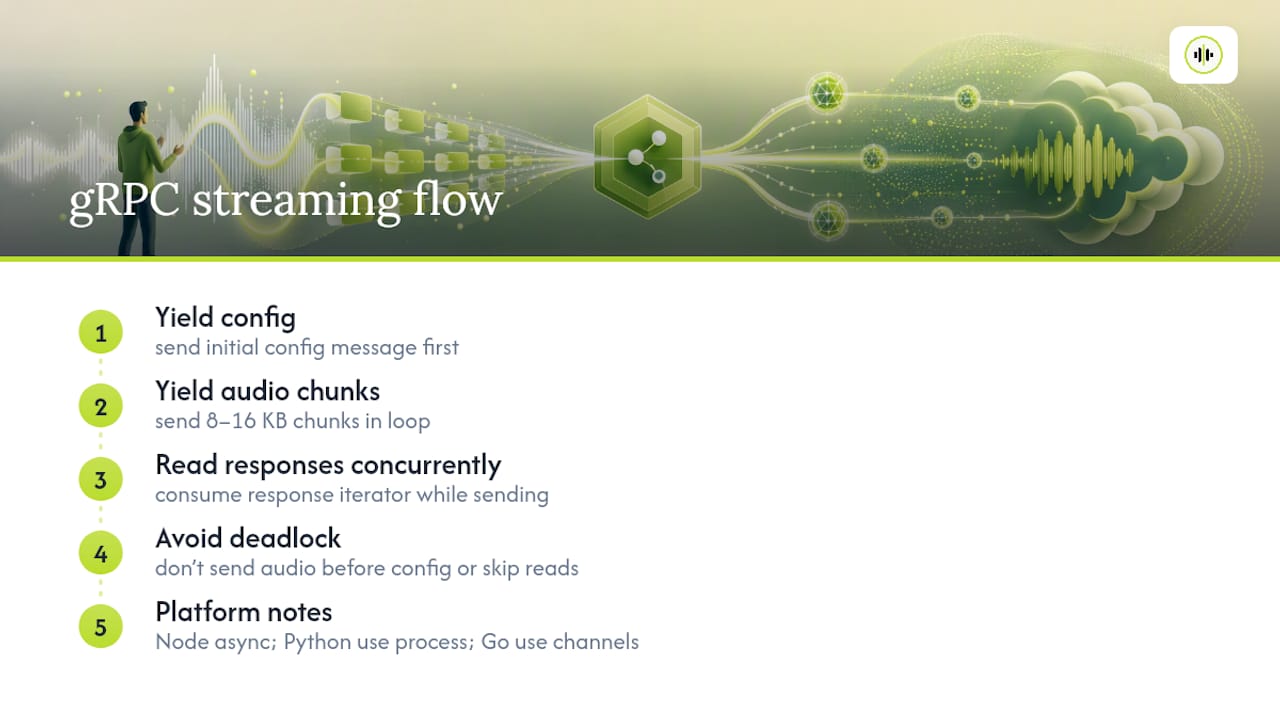
def request_generator(audio_source, config):
    yield StreamingRecognizeRequest(streaming_config=config)
    for chunk in audio_source.read_chunks(size=8192):
        yield StreamingRecognizeRequest(audio_content=chunk)

responses = client.streaming_recognize(requests=request_generator(source, config))
for response in responses:
    handle_result(response)
That’s a compact Python sketch of the whole flow. Go and Java clients follow the identical shape: a send loop that writes requests to the stream, and a receive loop reading from the response iterator, usually on separate goroutines or threads because gRPC expects both directions active at once.
The official client libraries expose a
streamingRecognizemethod that returns a response iterator you read while continuing to send audio requests. Miss that concurrency and the stream deadlocks waiting for a response that hasn’t arrived yet.
Platform quirks matter here. Node’s single-threaded event loop means your chunk producer has to be async or you’ll block the response listener. Python’s GIL means CPU-bound audio processing (resampling, VAD) belongs in a separate process, not just a thread, if you want the sender and receiver to stay responsive. Go’s channels make the producer/consumer split almost trivial, which is part of why it’s a common choice for this kind of pipeline.
How Do You Fix Common gRPC Speech Streaming Errors?
Most failures trace back to one of four causes, and all four are fast to check once you know where to look.
- “Message too large” or proto parse errors: your chunk size exceeds the per-message limit. Log the byte length of every frame before it’s sent and slice into smaller pieces if any frame is close to the ceiling.
- Garbled or empty transcripts: an encoding mismatch. Verify the declared sample rate matches the actual audio, confirm mono versus stereo, and check the PCM bit depth against what the config specifies.
- Stream drops mid-session: a network issue, not a protocol issue. Add gRPC keepalive pings, set reasonable deadlines instead of infinite waits, and implement reconnect logic with exponential backoff.
- Auth or permission denials: the credential lacks the right scope or IAM role for the recognizer resource; this usually surfaces on the very first message, before any audio is even sent.
| Symptom | Likely cause | Fix |
|---|---|---|
| Size or proto parse error | Chunk exceeds per-message limit | Slice frames smaller, target 8 to 16 KB |
| Garbled transcript | Sample rate or channel mismatch | Verify config matches actual audio format |
| Stream disconnects | Idle timeout or network drop | Enable keepalives, add backoff/reconnect |
| Auth failure on first message | Missing IAM role or scope | Recheck service account permissions |
Quota and billing limits typically show up in the same console or dashboard where the credential was provisioned. If a stream that worked yesterday suddenly fails universally rather than intermittently, check quota before touching a single line of client code.
How Does OpenTranscription Fit Into a gRPC Streaming Pipeline?
Real-time streaming transcription with speaker identification and support for many languages requires the protocol-level work covered above (config-first messages, chunk sizing, PCM formatting) regardless of which gRPC speech endpoint the client is pointed at. What differs is model selection: benchmarking multiple transcription models on cost, speed, and accuracy can shorten the evaluation cycle for teams trying to pick a model suited to live workloads rather than batch jobs. The realtime model rankings page and the model catalog are the fastest starting points for comparing options before committing a production pipeline to one provider.
What Are the Right Defaults for Production Streaming?
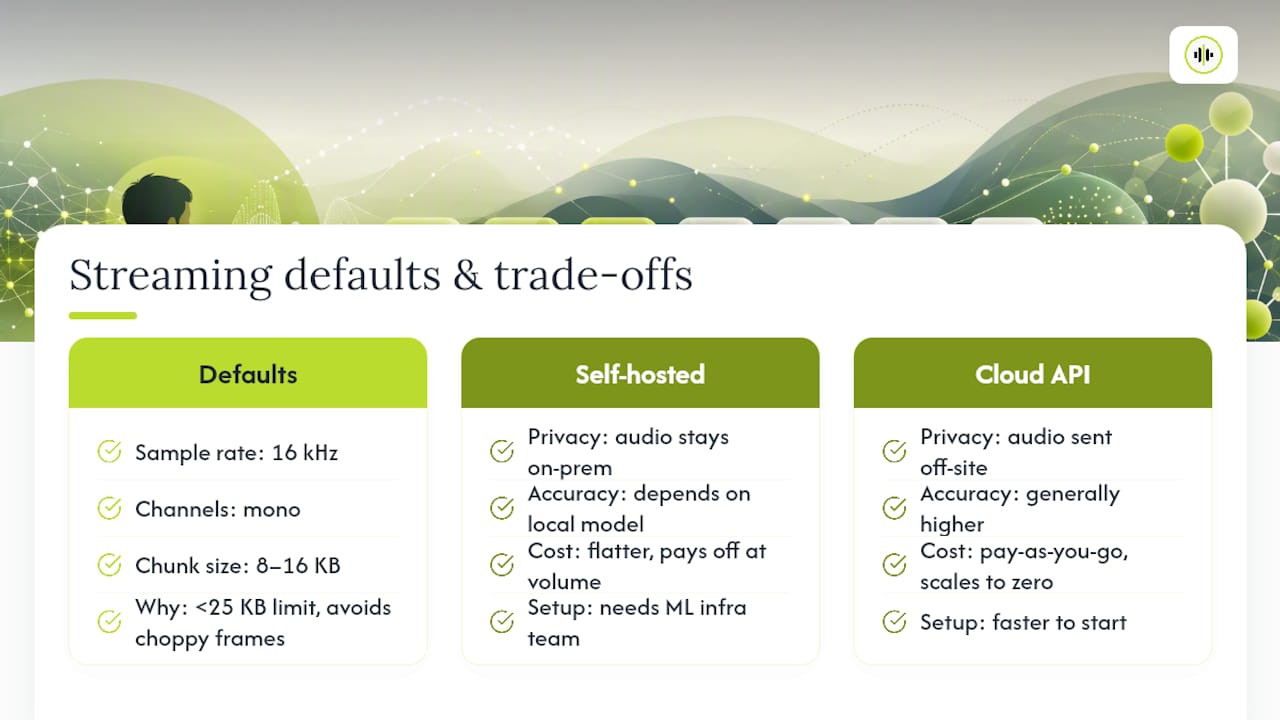
Sixteen kilohertz, mono, and chunks around 8 to 16 KB are the defaults worth defaulting to, not because they’re clever, but because they sit comfortably under the documented 25 KB per-message ceiling while giving the model enough audio context per frame to avoid choppy interim results. Going smaller adds overhead per message; going larger flirts with the size limit on every send.
The privacy and latency trade-off matters more than most teams weigh it: a locally hosted model avoids sending audio off-premises at all, which matters for regulated call data, while cloud streaming APIs generally win on raw accuracy and setup speed for teams without an ML infrastructure team already in place. Cost follows the same split, pay-as-you-go API calls scale down to zero for spiky traffic, while a self-hosted model has a flatter cost curve that pays off only at real volume.
— Benjamin
Get Started With gRPC Streaming on OpenTranscription
Some providers offer a unified API across many transcription models with real-time streaming, helping reduce the trial-and-error of testing separate vendor SDKs individually to find which model handles live audio at the latency and accuracy your product needs.
Pricing is typically transparent and based on usage, which matters most when a streaming workload is spiky rather than constant. Start by checking the realtime model rankings to see which models lead on speed versus accuracy for live use cases, then browse the full model catalog for language coverage and pricing before wiring a client to OpenTranscription’s API. A short test stream against two or three ranked models will tell you more about fit than any spec sheet.
Sources
- Transcribe audio from streaming input | Cloud Speech-to-Text | Google Cloud Documentation
- google/cloud/speech/v1/cloud_speech.proto
- integrate-deepgram-with-zoom.mdx
FAQ
Is there an API that supports gRPC speech to text conversion?
Yes. Several providers expose streaming speech recognition through gRPC, including OpenTranscription, which pairs streaming with model benchmarking across cost, speed, and accuracy on many models.
Is there a free speech-to-text API available for testing?
Some providers offer limited free tiers or trial credits for streaming and batch transcription, but ongoing production use of gRPC streaming typically runs on paid, usage-based pricing rather than a permanently free tier.
Which speech-to-text API is best for real-time streaming?
The best choice depends on latency, language coverage, and cost for a specific workload rather than one universal answer; comparing models on a benchmarking platform like OpenTranscription’s realtime rankings is faster than testing each vendor’s SDK individually.
Is text-to-speech free to use?
Text-to-speech (the reverse of transcription) usually follows the same pattern as speech-to-text: limited free tiers exist for testing, but production-scale usage is billed per character or per second of generated audio.
Why does gRPC require a config-only first message?
The protocol enforces this ordering so the server knows the audio encoding, sample rate, and language before a single audio byte arrives, which lets it initialize the recognition model correctly. Sending audio before or alongside that first message breaks the stream rather than triggering a warning.