

Word-Level Timestamps for Developers: Production-Ready Methods
Yes, reliable word-level timestamps are achievable for most production workflows, but base transformer ASR models rarely produce frame-accurate timing natively. The standard approach pairs an ASR transcript with a forced-alignment pass rather than trusting raw decoder attention alone.
For production-grade precision and repeatable results, use an ASR transcript plus forced alignment, or a model explicitly trained with forced-alignment supervision. Platforms like OpenTranscription expose word-level timestamps as a structured output field, while developers building in-house often reach for the PyTorch forced alignment tutorial as a reference implementation. Many cloud STT APIs report timing at a 100 millisecond offset granularity, which is a useful baseline when deciding how much precision your use case actually needs.
- Attention-derived timestamps (fast, approximate, prone to drift on noisy audio)
- ASR + forced alignment (slower, deterministic, closer to true word boundaries)
- Native timestamp-trained models (emerging, research-stage, promising for latency-sensitive work)
Word-level timestamps aren’t a single feature you turn on. They’re the output of a pipeline decision: how much latency you can tolerate versus how much timing precision your product actually requires.
Key Takeaways
Reliable word-level timestamps require pairing ASR output with forced alignment for precision-critical work, while attention-derived timestamps remain the faster, lower-precision default for many models.
| Point | Details |
|---|---|
| Forced alignment wins on precision | Use it when sub-100ms accuracy or clean word segmentation matters, such as media editing. |
| Attention-based timestamps are approximate | They’re a fast inference-time trick, prone to drift on noisy or pause-heavy audio. |
| Validate with real production audio | Track median and 90th percentile offset error, not just averages. |
| Merge short tokens before export | Fold sub-0.12 second words into neighbors to reduce timestamp jitter. |
| OpenTranscription offers timestamps out of the box | Its API returns structured transcripts with word-level timestamps, per-word confidence scores, and benchmarked model selection across 40+ models. |
Table of Contents
- How Are Word-Level Timestamps Generated?
- What Tools and Repos Implement Word-Level Timestamps?
- How Do You Build a Word-Timestamp Pipeline?
- How Accurate Are Word-Level Timestamps?
- How Do You Store and Convert Timestamp Formats?
- What Do Word Timestamps Cost at Scale?
- Which Approach Fits Your Use Case?
- What Actually Surprises Teams Building This
- Should You Build This In-House or Use a Managed API?
- Sources
- FAQ
How Are Word-Level Timestamps Generated?
Four algorithmic families produce word-level timestamps, and each trades precision against latency differently.
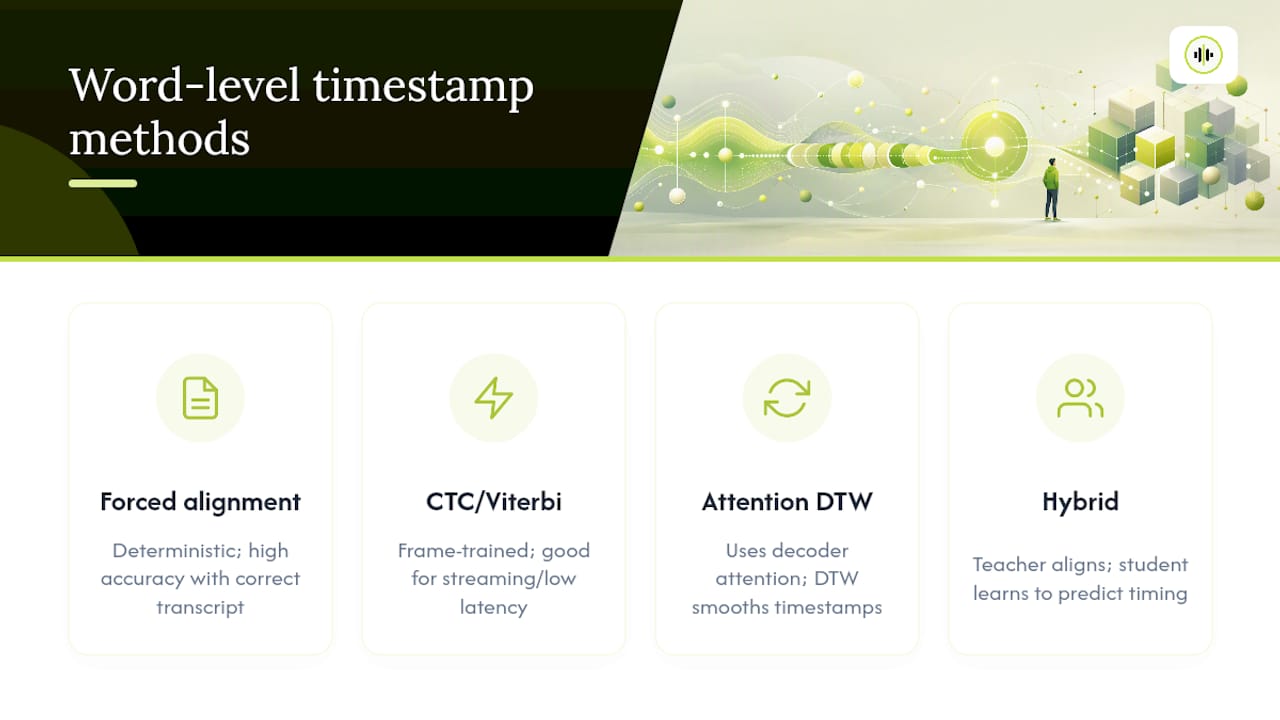
Forced alignment matches a known transcript to audio using Viterbi decoding, CTC, or phone-based acoustic models. It’s deterministic: given the same transcript and audio, you get the same alignment every time, and accuracy holds up well as long as the transcript itself is correct.
CTC or Viterbi alignments come from models trained with frame-level targets. They work well in streaming and low-latency contexts, but only if the underlying model was trained to support that kind of frame supervision in the first place.
Attention-based extraction with DTW postprocessing derives timestamps from a transformer’s decoder cross-attention weights, then smooths them with dynamic time warping. This is the common inference-time trick for models that weren’t explicitly trained to output timing, and dtw-python is one of the more widely used libraries for that refinement step.
Hybrid teacher-student pipelines are the newest entrant: an ASR system’s output is fed through a neural forced aligner acting as a teacher, and a second model is trained to predict word timing directly. Recent research shows this can push timestamp prediction toward becoming a native model capability instead of a bolt-on postprocessing step.
Pro Tip: If your transcript comes from a separate, high-accuracy ASR pass, forced alignment will almost always beat attention-derived timestamps for the same audio, because alignment only has to solve a matching problem, not a joint recognition-and-timing problem.
What Tools and Repos Implement Word-Level Timestamps?
Most implementations you’ll find in the wild fall into a handful of categories, built around the same core building blocks.
- Forced-aligner libraries and tutorials — the torchaudio forced alignment tutorial is the reference many teams start from, showing how to align transcripts to audio frames using phoneme-level models.
- DTW and alignment-refinement packages — dtw-python on PyPI and similar packages implement the distance and warping calculations used to clean up attention-derived timing.
- ASR client libraries with timestamp flags — many client SDKs expose a
word_timestampsstyle flag, though community discussion notes the results are typically produced by inference-time heuristics rather than frame-accurate training. - Community timestamping forks — public repos like whisperX demonstrate the full ASR-plus-alignment pattern, packaging extraction scripts and stabilization utilities together.
The typical output is a JSON structure carrying word text, start time, end time, and a token-level probability, which you then convert into SRT, WebVTT, or inline timecodes depending on the target use case.
How Do You Build a Word-Timestamp Pipeline?
A production-grade ASR-to-alignment pipeline breaks into five stages, and each one has its own failure modes worth guarding against.
- Pre-process audio. Resample to the model’s expected rate (commonly 16kHz), downmix to mono, and normalize levels. Inconsistent sample rates are a quiet source of alignment drift that’s easy to miss in testing.
- Run the ASR pass. Generate the transcript and segment-level boundaries. This gives you the text that forced alignment will anchor to the audio.
- Run forced alignment. Feed the transcript and audio into an aligner (phoneme-based models via torchaudio, or a CTC-based aligner) to compute per-word start and end times.
- Postprocess timestamps. Filter low-confidence words, merge short adjacent tokens, and round to your target granularity, often 10 to 100 milliseconds depending on downstream use.
- Serialize output. Write JSON for programmatic use, or convert to SRT and WebVTT for caption delivery.
A minimal pipeline structure looks like this in pseudocode:
audio = preprocess(raw_audio, sample_rate=16000, mono=True)
transcript, segments = asr_model.transcribe(audio)
alignment = forced_aligner.align(transcript, audio)
words = postprocess(alignment, min_duration=0.12, confidence_threshold=0.5)
export(words, format="json")  # or srt, webvtt
Operationally, forced alignment is CPU-friendly for shorter files but benefits from batching when you’re processing large archives. ASR inference is the heavier GPU cost; running alignment as a separate CPU-bound step after batch ASR is usually more resource-efficient than doing both on the same device sequentially.
- Batch multiple files through ASR before running alignment separately to keep GPU utilization high.
- Cap memory growth by streaming long files in chunks rather than loading full-length audio into alignment models at once.
- Keep a raw, unrounded timestamp copy before any postprocessing, in case you need to re-derive tighter or looser tolerances later.
Pro Tip: Very short words (articles, single-syllable fillers) are the most common source of jitter. Merge any token under roughly 0.12 seconds into its neighbor, and drop or flag words below a set probability threshold before they reach your output schema.
How Accurate Are Word-Level Timestamps?
Accuracy depends heavily on audio conditions, not just model choice. Background noise, overlapping speakers, fast speech, and aggressive subword tokenization all introduce drift, and long pauses are a particularly common culprit because attention-based methods can struggle to represent silence cleanly.
Community reports on Whisper-style models confirm this pattern directly: word timestamps are often produced through inference-time heuristics rather than a frame-accurate trained output, and results vary with noise and pacing. Forced aligners tend to produce cleaner segmentation with visible gaps between words, while attention-derived timestamps can show contiguous, gapless start and end times even where real silence exists in the audio.
Track these metrics when validating a pipeline:
- Mean and median absolute per-word offset error.
- Percentage of words landing within a defined tolerance, such as under 100 milliseconds.
- Distribution of token-level confidence scores across a representative sample.
Pro Tip: Benchmark on audio that matches your real production conditions: same language, same microphone type, same typical speech rate. Report both the median error and the 90th percentile error; the tail is usually where noisy or overlapping-speaker segments hide.
Discussion threads on model behavior echo this caution: attention-derived timestamps are practical for many tasks but shouldn’t be treated as a substitute for forced alignment when sub-100ms accuracy actually matters to the product.
How Do You Store and Convert Timestamp Formats?
Most pipelines settle on a JSON schema carrying word text, start time, end time, a token-level probability score, and a segment identifier tying words back to their sentence or utterance.
From there, converting between formats is mostly a grouping problem:
- JSON to SRT groups words into subtitle lines under a maximum duration and character count, typically two lines and around 40 characters per line.
- JSON to WebVTT follows a similar grouping logic with WebVTT’s own timestamp and cue formatting.
- Inline timecodes embed timing directly into searchable transcript text, useful for jump-to-word navigation in a transcript viewer.
For manual QA, a desktop editor like Audacity lets you inspect waveforms directly and manually correct or re-label segments where automated alignment clearly misfires. Batch postprocessing scripts typically handle the routine work: stripping low-confidence words, rounding timestamps to a fixed granularity, and re-running alignment only on flagged problem segments rather than the whole file.
What Do Word Timestamps Cost at Scale?
Model-native timestamps, where available, are lower-latency but can carry higher memory overhead at inference time and generally trade off some precision for speed. ASR plus forced alignment adds a distinct processing stage and its own compute cost, but the payoff is more deterministic timing that’s easier to validate automatically.
Plan for GPU time on the ASR pass, CPU time for alignment, storage for per-word metadata, and increased I/O from verbose JSON outputs compared to plain transcript text.
- GPU cost scales with ASR model size and audio volume, not with alignment.
- CPU-based forced alignment is comparatively cheap and batches well.
- Verbose per-word JSON can meaningfully increase storage and transfer costs at high transcript volume.
Which Approach Fits Your Use Case?
The right method depends on what you’re actually optimizing for: latency, precision, or searchability.
- Live captions — prefer model-native timestamping or CTC-style streaming models, where strict latency matters more than sub-100ms precision.
- High-precision editing or media production — prefer ASR output plus forced alignment, with a manual QA pass over flagged low-confidence regions.
- Search and accessibility features — either approach can work; validate per-word confidence scores and remediate the weak spots rather than assuming uniform accuracy across a file.
What Actually Surprises Teams Building This
The recurring issue isn’t algorithm choice. It’s tokenization artifacts and silent gaps that quietly break attention alignment on audio that looked fine in a quick manual listen. Teams tend to chase a “better model” fix when the real culprit is often upstream.
A resample rate mismatch or a poorly tuned noise gate frequently improves alignment more than switching to a larger ASR model entirely. Measure on your actual production audio before assuming a model swap will fix drift, because the fix is usually in preprocessing, not in the decoder.
Should You Build This In-House or Use a Managed API?
Building a forced-alignment pipeline in-house gives you full control, but it also means owning model selection, benchmarking, DTW tuning, and ongoing maintenance as libraries and models change. For teams that want production reliability without that overhead, a managed option like OpenTranscription provides structured transcripts with word-level timestamps and per-word confidence scores already built into the output.

OpenTranscription benchmarks over 40 transcription models on accuracy, speed, and cost, so you can pick a model suited to your latency and precision needs instead of guessing. Output formats cover the same JSON, SRT, and WebVTT structures discussed above, and real-time streaming support is available for applications where live captioning is the priority. Billing is per-second with no subscription commitment, which matters if your transcription volume is uneven month to month.
If you want to compare timestamp precision and latency across models before committing to an architecture, start with the transcription models catalog or check the realtime model rankings for latency-sensitive use cases.
Sources
- Word Level Timestamp Generation for Automatic Speech Recognition and Translation
- Forced alignment tutorial | torchaudio
- How can I get word-level timestamps in OpenAI’s Whisper ASR?
- dtw-python on PyPI
FAQ
How Do I Insert a Timestamp Into a Transcript?
Run forced alignment or an ASR model with timestamp output enabled, which returns start and end times per word that you then embed as inline timecodes or structured JSON fields.
How Do I Transcribe Audio With Timestamps?
Use an ASR model to generate the transcript, then either enable a native word-timestamp flag or run a separate forced-alignment pass for higher precision. Managed APIs like OpenTranscription return timestamps as part of the structured transcript output by default.
How Do I Remove Timestamps From a Transcript?
Strip the start and end time fields from your JSON output during postprocessing, or export a plain-text version of the transcript that omits the timing schema entirely.
Should Transcripts Have Timestamps?
For captioning, search, editing, and accessibility use cases, yes. Plain transcripts without timing are fine for simple text review but lose the ability to jump to or verify specific moments in the audio.