

LangChain Speech to Text: Batch Loaders vs. Streaming Pipelines
Use LangChain’s document loaders for file-based transcription and a streaming STT → Agent → TTS pipeline for real-time voice agents. The two patterns solve different problems and rarely substitute for each other.
- Batch pattern:
SpeechToTextLoader-style classes and Whisper-based parsers pull complete files into LangChainDocumentobjects, prioritizing accuracy over speed. - Streaming pattern:
RunnableGeneratorchains and websocket-based automated speech recognition connect microphone input to an agent and text-to-speech output as a continuous event stream. - Latency target: conversational agents should aim for sub-700ms round-trip latency, which requires partial transcripts rather than waiting for a finalized result.
Key Takeaways
Batch loaders handle file transcription for accuracy-driven work, while a streaming sandwich pipeline with sub-700ms latency and partial transcripts is what makes a LangChain voice agent feel responsive.
| Point | Details |
|---|---|
| Match pattern to use case | Use batch loaders for files and archives; use streaming runnables for live conversation. |
| Watch the blocking behavior | Synchronous loaders block until done, which breaks real-time agents. |
| Standardize event types | Adopt stt_chunk, stt_output, agent_chunk, and tts_chunk as your pipeline’s shared vocabulary. |
| Normalize audio early | Use ffmpeg to set sampling rate and encoding before audio reaches any STT provider. |
| Benchmark before committing | Compare model tradeoffs on cost, speed, and accuracy instead of guessing which provider fits. |
Table of Contents
- What Are the Main LangChain Speech-to-Text Patterns?
- Which LangChain Components Handle Speech to Text?
- How Do You Integrate Specific STT Providers in LangChain?
- How Do You Design a Real-Time STT Event Pipeline?
- Building a Minimal Mic-to-Agent-to-Speech Pipeline
- What Do You Need to Install Before You Start?
- What Mistakes Cause Latency and Accuracy Problems?
- Where Does OpenTranscription Fit Into a LangChain Pipeline?
- Where to Learn More About LangChain Voice Pipelines
- What the Conventional Advice Gets Wrong
- Sources
- FAQ
What Are the Main LangChain Speech-to-Text Patterns?
Batch ingestion and real-time streaming solve fundamentally different problems, and picking the wrong one is the most common mistake in early-stage voice projects.
Batch ingestion fits retrieval-augmented generation, call analytics, and archival transcription. Here accuracy, speaker metadata, and structured output matter more than speed, since a document loader can take several seconds per file without hurting the user experience.
Real-time voice agents flip those priorities. Latency, partial transcript delivery, and responsive text-to-speech synthesis matter more than squeezing out the last percentage point of word accuracy. This is where the “sandwich” architecture comes in: speech-to-text feeds an agent, the agent feeds text-to-speech, and all three stages run concurrently rather than sequentially. Some providers now support direct speech-to-speech (S2S) models that collapse the sandwich into a single call, which can reduce latency further but sacrifices the ability to inspect or moderate the intermediate transcript.
- Batch: accuracy and metadata first, latency secondary.
- Streaming: latency and partial output first, final polish secondary.
- S2S: fewer moving parts, less visibility into what the model actually heard.
Which LangChain Components Handle Speech to Text?
LangChain audio to text work generally splits across three component types, and matching the right one to the job avoids a lot of wasted engineering time.
SpeechToTextLoader and Whisper-style parsers are the right tool when you have a complete audio file sitting on disk or in cloud storage and want a Document object back with transcript and metadata. Google’s implementation, for instance, wraps the google-cloud-speech package and transcribes audio files into LangChain Documents with configurable recognition models and language codes.
Streaming automated speech recognition is a different animal entirely. You need a runnable, typically built with RunnableGenerator, that maintains an open websocket or streaming REST connection and yields text chunks as audio arrives rather than after it finishes.
The dividing line is blocking behavior. Synchronous loaders call .load() and block until transcription completes, which is fine for a background job but unacceptable in a live conversation. File-size and duration limits on these loaders reinforce that they were built for documents, not dialogue.
- Batch jobs:
SpeechToTextLoader, Whisper parsers, Google’s synchronous recognizer. - Live conversation: custom or provider-supplied streaming runnables, never a blocking loader.
- Rule of thumb: if the audio source is still growing while you’re processing it, you need streaming.
How Do You Integrate Specific STT Providers in LangChain?
Each provider brings its own configuration quirks, and getting them wrong is the fastest way to burn an afternoon on a silent failure.
- Google
SpeechToTextLoader. Setproject_id, afile_path(local orgs://URI), and a recognition config that specifies the model,language_codes, and any features like automatic punctuation. This loader is batch only, so reserve it for archival transcription and RAG ingestion rather than live agents. - AssemblyAI and similar real-time providers. These typically expose a websocket endpoint that expects raw audio bytes and emits partial and final transcript events. Store the API key as an environment variable, open the socket once per session, and design your consumer to handle
stt_chunkevents as they arrive rather than buffering everything. - NVIDIA Riva. RivaASR and RivaTTS runnables convert audio bytes to text and back, and they’re built for on-prem or edge deployments where GPU acceleration keeps latency low without a round trip to a public cloud endpoint. This matters for regulated environments or facilities without reliable internet.
- Whisper and Azure parsers. Useful for offline batch parsing, but watch file-size ceilings closely. Large audio files may need chunking before they hit the parser at all.
How Do You Design a Real-Time STT Event Pipeline?
A voice agent pipeline works best as a producer-consumer system with a single unified event stream rather than a chain of blocking function calls.
The event types worth standardizing on are stt_chunk (a partial or interim transcript fragment), stt_output (a finalized transcript segment), agent_chunk (streamed tokens from the language model), tts_chunk (synthesized audio bytes), and tool_call/tool_result for any function calling the agent triggers mid-conversation. The voice-sandwich-demo repository demonstrates this pattern with async generators composing three RunnableGenerator stages: one for STT, one for the agent, one for TTS.
- The STT stage yields
stt_chunkevents as audio streams in, then a finalstt_outputonce the segment closes. - The agent stage consumes
stt_outputand starts yieldingagent_chunktokens as soon as it has enough context to respond, rather than waiting for a full sentence. - The TTS stage should start synthesizing audio on stable
agent_chunkpartials, not the finalized agent response, since waiting for full finalization is one of the biggest sources of perceived lag. - Merge these streams with async generators so all three stages run concurrently instead of in sequence.
Pro Tip: Log the timestamp of every event type as it crosses each stage boundary. That single habit turns “the agent feels slow” into a concrete answer about whether the bottleneck sits in STT, the language model, or TTS.
Sub-700ms end-to-end latency is achievable with the right provider combination, but only if partial transcripts are flowing through the pipeline instead of sitting in a buffer.

Building a Minimal Mic-to-Agent-to-Speech Pipeline
A working prototype needs less code than most developers expect, provided the plumbing follows the producer-consumer pattern already described.
- Open a WebSocket connection from the browser using
getUserMedia, capture raw PCM audio chunks, and push them into an async queue that feeds yourstt_streamgenerator. - Wire three
RunnableGeneratorstages together: the first calls your STT provider’s streaming API and yieldsstt_chunk/stt_outputevents, the second is your agent logic consuming those events, and the third calls a streaming TTS API. Keep provider API keys in environment variables, never hardcoded. - Forward partial transcripts to the agent only for context tracking; wait for
stt_outputbefore triggering a full agent response, but allow TTS to begin on stableagent_chunkpartials rather than the complete reply. - During development without hardware access, pipe a test file through
ffmpegto emulate a live microphone feed at the sampling rate your provider expects, commonly 16kHz mono.
Instrumenting each handoff point (stt_chunk → agent_chunk → tts_chunk) is how the voice-sandwich-demo team identifies which stage is adding the most delay, and it’s a habit worth copying before you ship anything to real users.
What Do You Need to Install Before You Start?
A short preflight checklist prevents most of the setup errors that waste a first afternoon with any new STT provider.
- Install
langchain,langchain-google-community(for Google’s loader), and any provider SDK your streaming service requires. - Install
ffmpeglocally and use it to normalize audio to 16kHz or 24kHz mono before sending it to most speech recognition APIs, since mismatched sample rates are a frequent source of garbled transcripts. - Set environment variables for API keys, Google Cloud
project_id, and any recognizer resource IDs your provider requires. - Check file-size and duration limits on synchronous loaders before batching large archives, and enable the Speech-to-Text API plus billing on your Google Cloud project ahead of time.
What Mistakes Cause Latency and Accuracy Problems?
Most production issues with LangChain voice recognition trace back to a handful of repeatable mistakes rather than provider quality.
Favor streaming APIs and non-blocking runnables for anything conversational; a blocking loader inside a live agent loop will make the whole interaction feel frozen. Normalize audio on the client before it ever reaches your pipeline, and keep chunk sizes small enough that the first stt_chunk arrives quickly rather than waiting on a large buffer to fill.
Instrument latency at every stage boundary and log confidence scores alongside each transcript segment. Low confidence scores are an early warning sign of accent mismatch, background noise, or a wrong sampling rate, and catching that in logs beats catching it in a user complaint.
- Prefer streaming, non-blocking runnables in any conversational context.
- Keep audio chunks small and normalized before they leave the client.
- Log confidence scores and per-stage latency for ongoing quality monitoring.
- Build retries and graceful degradation (a fallback transcript or an apology prompt) for when STT stalls mid-session.
Pro Tip: Treat a sudden drop in average confidence score as a signal worth alerting on, the same way you’d alert on error rate. It usually surfaces a provider outage or a hardware regression before a single user complains.
Where Does OpenTranscription Fit Into a LangChain Pipeline?
Picking the right speech-to-text model for a LangChain project usually means comparing tradeoffs across dozens of providers, which is tedious to do manually every time requirements shift.
OpenTranscription benchmarks over 40 transcription models side by side, so you can compare cost, speed, and accuracy before wiring a provider into your sandwich architecture. The platform supports realtime streaming, speaker diarization, and more than 105 languages, with structured transcripts that include word-level timestamps and confidence scores, which is exactly the kind of data you want feeding your latency and quality logs.
- Compare providers by latency and accuracy using the model benchmarking catalog before committing to one inside your pipeline.
- Swap providers behind a unified API instead of rewriting integration code for each vendor’s SDK.
- Pay per second of audio processed, with no subscription commitment, which matters when you’re still prototyping which model fits your agent.
Where to Learn More About LangChain Voice Pipelines
Start with LangChain’s own voice agent documentation and the voice-sandwich-demo repository for a working event-stream reference. For provider-specific latency profiles, OpenTranscription’s Google Cloud Speech-to-Text model profile and Chirp 3 research report cover streaming characteristics in more depth.
What the Conventional Advice Gets Wrong
Most tutorials treat speech-to-text as a solved problem: plug in an API key, call a function, get text back. That framing works for batch transcription and falls apart the moment you try to build a conversational agent with it.
The real architectural decision isn’t which provider to pick first. It’s whether you’re building for accuracy or for responsiveness, because those two goals pull in opposite directions. A model tuned for maximum word accuracy on long-form audio is often the wrong choice for a voice agent that needs to start responding before the sentence has even finished, and developers who skip that decision end up retrofitting a batch-oriented integration into a real-time product months later.
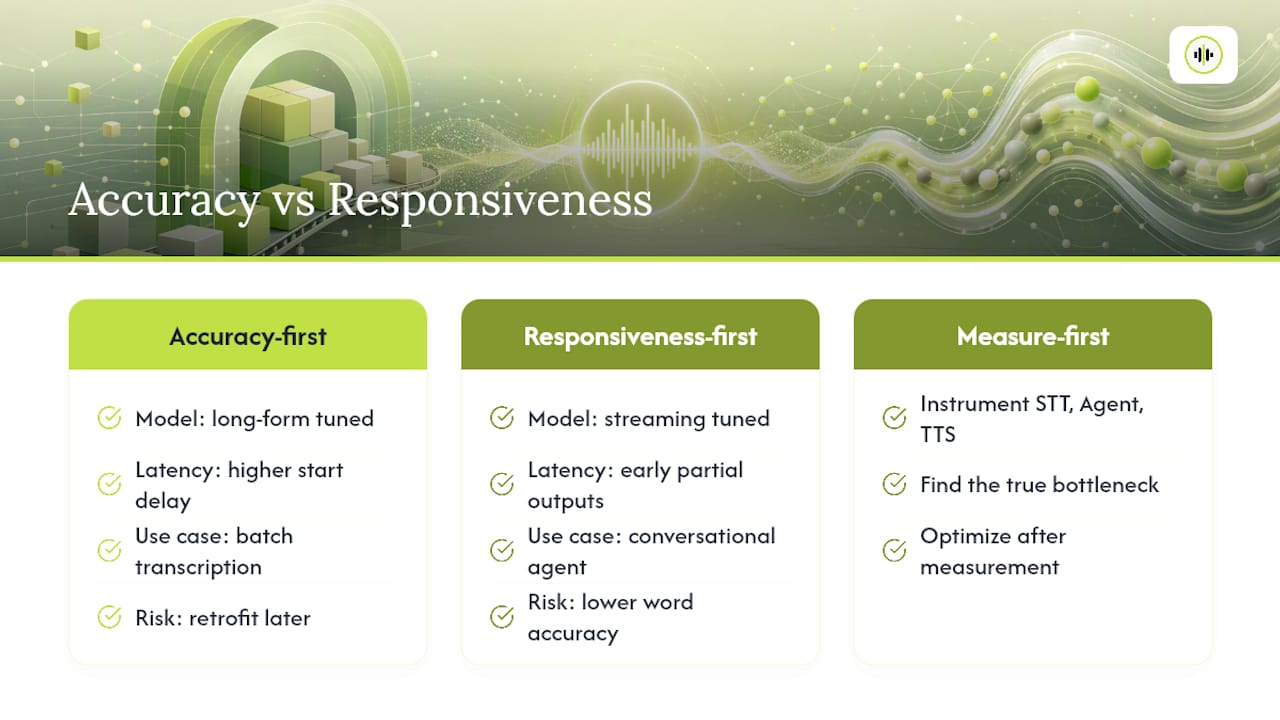
The other underrated point is that latency isn’t one number, it’s three: STT, agent reasoning, and TTS. Teams obsess over choosing the “best” transcription model while ignoring that their agent’s token generation is the actual bottleneck. Instrument all three stages before you optimize any of them. If you take one thing from this guide, make it that measurement discipline, not a provider name.
Sources
FAQ
How Do I Turn Speech Into Text in LangChain?
Use SpeechToTextLoader or a Whisper parser for complete audio files, or a streaming runnable built with RunnableGenerator for live microphone input that needs partial transcripts.
Is There a Free API for Speech to Text?
Several providers offer limited free tiers for testing, but production LangChain voice agents typically need paid streaming access; per-second pricing models like OpenTranscription’s let you test multiple providers without a subscription commitment.
Can ChatGPT Do Speech to Text?
OpenAI’s Whisper model, which powers some ChatGPT voice features, can be called directly through Whisper parsers in LangChain for batch transcription, though it isn’t a native LangChain streaming component on its own.
Which AI Model Is Best for Speech to Text?
The best model depends on whether you need offline accuracy or real-time responsiveness. Comparing providers on documented latency and accuracy benchmarks before committing is more reliable than picking one brand by reputation.