

How to Build a Production Audio to Text Pipeline
A minimal production audio to text pipeline runs six stages in sequence: input normalization, chunking/voice activity detection (VAD), ASR inference, post-processing, diarization, and export/storage. The primary architecture decision that determines whether this holds up under load is separating streaming and batch paths from day one, not retrofitting them later.
- Streaming path: persistent WebSocket or gRPC connections, low-latency models, reserved capacity
- Batch path: async job queue, job IDs and callbacks, larger models tuned for accuracy over speed
Latency benchmark: target end-to-end latency under 1.2 seconds for conversational use cases; users notice delay past 2 seconds and frequently abandon past 3.
A reasonable default configuration: 16kHz mono audio, VAD-based cutting for live streams, and fixed-length chunks with a short overlap for long-form batch jobs.
Key Takeaways
A production-ready audio to text pipeline succeeds by separating streaming and batch architectures early, tuning chunking and model size independently for each lane, and validating output with WER-based evaluation rather than assumptions.
| Point | Details |
|---|---|
| Split streaming and batch | Route persistent connections and async jobs to separate fleets so batch load never degrades real-time latency. |
| Default to 25s chunks with overlap | Use fixed windows for clean long-form audio; switch to VAD-based cutting for noisy or multi-speaker input. |
| Match model size to lane | Run tiny/small models for streaming and medium/large models for batch accuracy-focused jobs. |
| Set a latency budget | Target under 1.2 seconds end-to-end and alert when p99 latency crosses roughly 3 seconds. |
| Validate with WER, not instinct | Run transcribe/evaluate/benchmark scripts in CI against a domain-specific held-out sample. |
| Consider a unified API layer | OpenTranscription lets you route streaming and batch jobs through one interface with model-level benchmarking and per-second billing. |
Table of Contents
- What Are the Core Stages of an Audio Transcription Pipeline?
- Fixed-Size Chunks or VAD: Which Chunking Strategy Wins?
- Which ASR Model Size Fits Streaming vs Batch?
- How Do You Scale a Pipeline Without Breaking Latency?
- How Do You Align Speaker Diarization With Transcript Timestamps?
- How Do You Validate Transcript Quality Before Shipping?
- How Does OpenTranscription Fit Into This Architecture?
- Handling Noisy and Multi-Speaker Audio
- End-to-End Architecture Design Patterns and Frameworks
- Integrating Language Models for Contextual Adaptation
- Data Privacy and Security in Audio Processing
- Error Handling and Fallback Strategies Across Pipeline Stages
- Fine-Tuning ASR Models for Domain-Specific Vocabulary
- What This Guide Gets Right That Most Don’t
- Get a Working Pipeline Without Building the Infrastructure Yourself
- Sources
- FAQ
What Are the Core Stages of an Audio Transcription Pipeline?
Each module in an automated transcription process has a distinct job and a predictable input/output shape, which matters when you’re wiring services together or debugging a bad transcript.
- Audio input: normalizes format (commonly 16kHz mono float32) and captures metadata like sample rate and channel count, since mismatched sample rates are a frequent silent failure mode.
- Chunker/VAD: splits continuous audio into segments with start and end timestamps, and a well-tuned VAD avoids cutting mid-word.
- ASR inference: produces token streams alongside word-level timestamps and confidence scores per token.
- Post-processing: restores punctuation and casing, and inserts custom vocabulary terms the base model may not recognize.
- Diarization: assigns speaker labels and aligns them to the ASR timestamp grid.
- Output: renders SRT/VTT for captioning workflows or JSON/TSV for downstream analytics and search indexing.
Each stage can fail independently, so building them as separable modules (rather than one monolithic function) pays off the first time you need to swap a model or add a language.
Fixed-Size Chunks or VAD: Which Chunking Strategy Wins?
Chunking is arguably the single most influential knob in the entire pipeline: smaller chunks reduce latency but lose context, which tends to push error rates up, while larger chunks improve accuracy but add delay.
- Fixed-size windows (25 seconds, 2-second overlap): simple to implement, predictable memory and compute usage, works well on clean long-form audio like podcasts or lectures
- VAD-based cutting: segments at natural silences, avoids splitting speech mid-sentence, and is the better default for multi-speaker or noisy recordings
- Overlap deduplication: when using fixed windows, the overlapping region produces duplicate words at the boundary; alignment logic needs to detect and merge repeated tokens before concatenating transcripts
- VAD tuning knobs: pre-speech padding prevents clipping the start of an utterance, and redemption frames (a short grace period before ending a segment) stop the VAD from splitting a sentence on a brief pause
Pro Tip: Set your pre-speech pad to at least 200 to 300 milliseconds. Shaving it too tight is a common cause of clipped first words in real-time captioning.
Which ASR Model Size Fits Streaming vs Batch?
Model selection is a latency-versus-accuracy trade rather than a single “best” choice, and the right answer depends on which lane the audio is running through.
- Tiny/base/small models suit streaming lanes where sub-second response matters more than squeezing out the last few points of accuracy
- Medium/large models belong in batch jobs, where you can afford several seconds of inference time in exchange for lower word error rates
- Partial transcripts: streaming lanes should emit interim decoding results as audio arrives and finalize the transcript only when a segment closes, since emitting partials at every stage is the main lever for cutting perceived latency
- Deployment patterns: keep a warm pool of loaded models to avoid cold-start penalties, apply quantization to shrink memory footprint, and reserve GPU inference for high-throughput batch work while smaller CPU-bound models handle streaming
- Cost controls: per-second billing means idle warm pools cost money even when unused, so cache transcripts for repeated audio (common in support call libraries or recurring meeting recordings) instead of re-transcribing
The model catalog approach, where you benchmark multiple model sizes against your own audio before committing, tends to reveal that the “best” model changes depending on whether you’re optimizing for cost, speed, or accuracy on a given dataset.
How Do You Scale a Pipeline Without Breaking Latency?
The architecture that prevents a burst of batch jobs from starving real-time captioning is a hard split at the gateway layer: streaming traffic routes to persistent connections while batch traffic drops into an async job queue with its own worker pool.
- Gateway routing: WebSocket or gRPC connections for streaming, job IDs and callback URLs for batch, so the two workloads never compete for the same compute.
- Reserved capacity: dedicate a fleet slice to streaming and autoscale it on active connection count, while batch fleets autoscale on queue depth instead.
- Latency budgets: set an end-to-end target under 1.2 seconds for conversational use cases, and alert when p99 latency crosses roughly 3 seconds, the point where users start abandoning sessions.
- Operational safeguards: apply backpressure when queues back up, retry failed jobs with exponential backoff, and checkpoint long batch jobs so a crash mid-transcription doesn’t force a full restart.
Producer-consumer patterns from voice-agent frameworks like LangChain’s streaming implementation illustrate how sub-second latencies get achieved in practice: not through faster models alone, but through careful pipelining between stages.
How Do You Align Speaker Diarization With Transcript Timestamps?
Diarization produces speaker segments (start time, end time, speaker ID) that need to be mapped onto the word-level timestamps ASR already generated, and the alignment logic is where most implementation bugs live.
- Merge rule: set a configurable
max_gapthreshold, and merge adjacent segments from the same speaker if the gap between them falls under it, which prevents a single sentence from fragmenting into multiple “speaker turns.” - Speaker-flipping artifacts: without a merge rule, brief pauses or noise can cause the diarizer to flip speaker labels mid-sentence, producing a garbled transcript.
- Sequencing choice: diarizing after ASR completes is simpler to align but adds latency, while running diarization concurrently with ASR gets you speaker labels faster at the cost of trickier synchronization logic.
- Overlapping speech: short interjections and talk-over moments are the hardest case; most production systems either assign overlapping audio to the dominant speaker or flag it as ambiguous rather than guessing.
How Do You Validate Transcript Quality Before Shipping?
Post-processing turns raw ASR output into something usable, and evaluation tells you whether the whole audio transcription pipeline is actually working.
- Punctuation and capitalization restoration runs after inference, since most ASR models output flat lowercase token streams without sentence structure.
- Custom vocabulary insertion corrects domain terms, product names, or acronyms the base model wasn’t trained on.
- Export formats: SRT/VTT serve captioning use cases, while JSON with per-word timestamps and confidence scores supports search and analytics.
- Quality metrics: word error rate (WER) and character error rate (CER) are the standard benchmarks, and NVIDIA’s NeMo Curator documents a comparable evaluation stage as a core part of production ASR pipelines.
- Testing harness:
transcribe.py,evaluate.py, andbenchmark.pyscripts with configs for model_size, chunk_strategy, and noise_reduction let you run regression checks in CI rather than eyeballing transcripts by hand.
How Does OpenTranscription Fit Into This Architecture?
Building each stage above from scratch, and re-benchmarking every time a new model ships, is exactly the maintenance burden OpenTranscription’s API is designed to remove. It provides unified access to dozens of transcription models with per-second billing and no subscription lock-in, so the model inference stage becomes a routing decision instead of a hosting problem.
- Realtime and batch support in one interface, matching the streaming/batch split covered above.
- Speaker identification built into the API response, handling the diarization stage without a separate service.
- Structured transcripts with confidence scores across 105+ languages, ready for the export/storage stage.
- Model comparison by cost, speed, and accuracy through the realtime model rankings, useful when your streaming lane needs a different model than your batch lane.
Pro Tip: Benchmark two or three candidate models against a sample of your actual production audio before locking in a default. Published accuracy figures rarely hold up against noisy real-world recordings.
Handling Noisy and Multi-Speaker Audio
Clean studio audio is the exception, not the rule, in most production systems. Call centers, field recordings, and multi-party meetings routinely combine background noise, overlapping speech, and inconsistent microphone quality, and each of those factors degrades ASR accuracy differently.
Noise suppression belongs before chunking, not after. Running a denoising filter on raw audio ahead of VAD improves segment boundaries, since noisy audio confuses silence detection and produces either over-segmented chunks (too many false starts) or under-segmented ones (VAD never detects a pause). A modular pipeline pattern that separates denoising from VAD as distinct components makes it easier to swap in a better noise model without touching the rest of the chain.
Multi-speaker audio compounds the problem because diarization accuracy drops sharply when speakers talk over each other or when microphone placement causes bleed between channels. If your input source supports it, capturing separate audio channels per speaker (common in call-center telephony) sidesteps diarization entirely, since channel separation already tells you who’s talking. When you only have a single mixed channel, VAD-based chunking outperforms fixed windows here, because it naturally isolates speech from silence in a way that helps the diarizer draw cleaner segment boundaries.
Confidence scores become critical in noisy conditions. A transcript segment with a low per-word confidence score is a signal worth surfacing to a human reviewer or a downstream consumer, rather than treating every output token as equally reliable. Pipelines that ignore confidence scores tend to silently ship garbled text in noisy segments with no way to flag it.
End-to-End Architecture Design Patterns and Frameworks
Two design patterns dominate production audio transcription pipeline builds: the linear pipeline and the producer-consumer streaming pattern.
The linear pipeline processes audio through each stage sequentially, batch job after batch job. It’s straightforward to implement, easy to debug because each stage’s output is inspectable, and it fits use cases like transcribing archived recordings or bulk podcast libraries where latency doesn’t matter. The NeMo Curator reference architecture follows this shape, chaining input management, batch inference, and quality assessment as discrete steps.
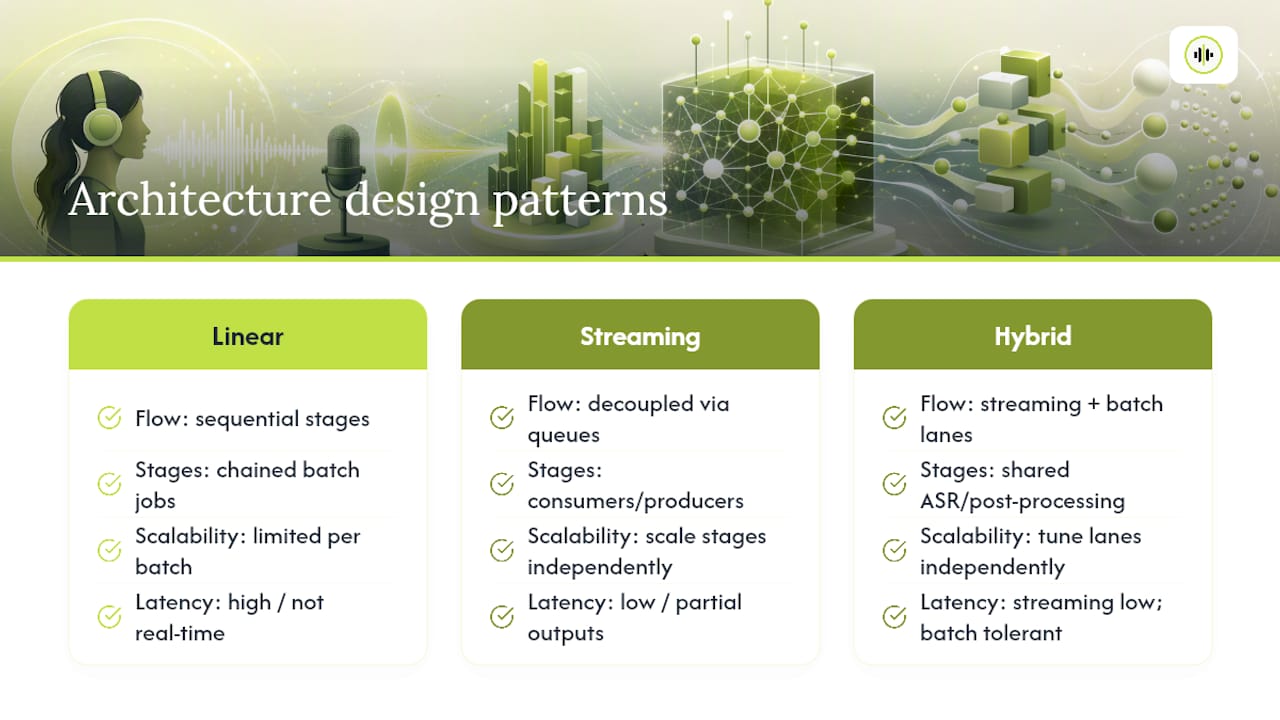
The producer-consumer pattern, common in voice-agent frameworks, treats audio as a continuous stream flowing through decoupled stages connected by queues or buffers rather than direct function calls. Each stage consumes from its input queue and produces to the next, which lets you scale individual stages independently and start emitting partial output before the full audio has finished. LangChain’s voice-agent implementation is a working example of this three-stage sandwich (speech-to-text, processing, text-to-speech) achieving sub-second latencies through careful buffering rather than raw model speed.
A hybrid pattern, used by most production systems at scale, runs the producer-consumer model for the streaming lane and the linear model for the batch lane, sharing the same underlying ASR and post-processing modules but with different orchestration around them. This is the architecture worth defaulting to unless you have a strong reason to build only one lane: it lets you reuse code across both paths while tuning each independently for its actual workload.
Integrating Language Models for Contextual Adaptation
Raw ASR output improves measurably when a language model gets involved after transcription, not instead of it. Two integration points matter most: rescoring and contextual correction.
Rescoring uses a language model to re-rank the ASR system’s candidate transcriptions (the “n-best list”) based on which sequence is most linguistically plausible, catching errors a pure acoustic model would miss, like homophones that sound identical but mean different things in context (“their” versus “there”). This step runs immediately after inference, before punctuation restoration.
Contextual adaptation goes further by injecting domain knowledge into the decoding process itself. If your pipeline transcribes medical dictation, legal depositions, or technical support calls, feeding a list of expected terms, names, or jargon into the model’s decoding step (sometimes called biasing or hotwording) measurably reduces errors on those specific terms, even when the base model has never seen them in training.
A third pattern worth building for is downstream summarization or intent extraction, where a large language model consumes the finished transcript to produce a summary, extract action items, or classify intent. This isn’t a pipeline stage in the traditional ASR sense, but it’s increasingly the actual business reason the transcription pipeline exists, and it’s worth designing your JSON export format with this consumer in mind from the start, including word-level timestamps and speaker labels the downstream LLM can use for grounding.
Data Privacy and Security in Audio Processing
Audio recordings routinely contain personally identifiable information, and in regulated industries (healthcare, finance, legal), the transcripts derived from them carry the same compliance obligations as the source recordings.
Encryption in transit and at rest is the baseline expectation for any pipeline handling customer audio. Audio uploaded to a streaming or batch endpoint should travel over TLS, and stored audio files or transcripts should be encrypted at rest, whether they sit in object storage or a database.
Retention policy deserves explicit design rather than an afterthought. Decide up front how long raw audio, intermediate chunks, and final transcripts are kept, and build automatic deletion into the storage stage rather than relying on manual cleanup. Some pipelines discard raw audio entirely after transcription completes, keeping only the text output, which reduces the attack surface considerably.
Access control matters at the API layer, not just storage. Job IDs and callback URLs for batch transcription should be scoped to the requesting client, and structured transcripts with speaker labels or confidence scores need the same access restrictions as the raw audio they came from.
For pipelines touching health data, financial records, or other regulated categories, verify the specific compliance requirements that apply to your jurisdiction and industry before processing that audio, since obligations vary by data type and region and general-purpose transcription infrastructure doesn’t automatically satisfy them.
Error Handling and Fallback Strategies Across Pipeline Stages
Every stage in an audio to text pipeline can fail independently, and a production system needs a defined fallback for each one rather than letting a single failure cascade through the whole job.
Input normalization failures, like an unsupported codec or a corrupted file header, should fail fast with a clear error rather than passing malformed audio downstream where it produces a confusing garbage transcript. Validate format and sample rate before the chunking stage even starts.
ASR inference failures need retry logic with exponential backoff, since transient issues (a model server restart, a brief network blip) are common in distributed systems and usually resolve on a second attempt. For batch jobs, checkpoint progress after each completed chunk, so a crash partway through a two-hour recording doesn’t force a full restart from scratch.
Diarization is the stage most likely to produce low-confidence rather than outright failed output. When diarization confidence falls below a threshold, a reasonable fallback is shipping the transcript without speaker labels rather than guessing and potentially misattributing sensitive statements to the wrong speaker.
For streaming lanes specifically, a dropped connection mid-utterance should trigger a graceful reconnect that resumes from the last acknowledged audio timestamp, not a full session restart, since restarting from zero mid-conversation creates a jarring user experience and duplicate transcript segments if not handled carefully.
Fine-Tuning ASR Models for Domain-Specific Vocabulary
General-purpose ASR models struggle with specialized vocabulary: drug names in clinical transcription, ticker symbols in financial audio, or product names in support calls. Three approaches address this, ranging from cheapest to most involved.
Vocabulary biasing is the lightest touch. Most modern ASR systems accept a supplied list of terms or phrases that get boosted during decoding, without any retraining. This works well for proper nouns and jargon that appear in predictable contexts, like a company’s own product line.
Post-processing correction runs a dictionary or fuzzy-matching pass over the finished transcript, swapping commonly misrecognized terms for their correct spelling. It’s simple to implement and doesn’t touch the model itself, but it only catches errors you’ve already seen and cataloged.
Fine-tuning the acoustic or language model on domain-specific audio and transcripts is the most effective option when you have enough labeled data (typically several hours of transcribed audio matching your target domain), and it’s the right investment when vocabulary biasing alone isn’t closing the gap. This is also where model selection matters: the model catalog lets you compare which base models perform best on your domain before deciding whether fine-tuning is worth the engineering investment, since some base models already handle certain vocabularies better out of the box.
Whichever approach you pick, measure its impact with a WER comparison on a held-out sample from your actual domain, not a generic benchmark dataset, since general benchmarks routinely fail to predict domain-specific performance.
What This Guide Gets Right That Most Don’t
Most write-ups on this topic treat chunking as an afterthought, a config value you set once and forget. The research doesn’t support that. Chunking strategy is the highest-leverage decision in the entire system, more consequential than which ASR model you pick, because it governs the latency-versus-context trade-off that every downstream stage inherits.
The other place conventional advice falls short is treating diarization as a bolt-on feature rather than a first-class stage with its own failure modes. Speaker-flipping artifacts and overlapping speech aren’t edge cases: they’re the default condition of real conversational audio, and pipelines that don’t budget engineering time for merge rules and confidence thresholds ship broken transcripts to production.
If you’re prioritizing where to spend effort first, spend it on the streaming/batch split and the chunking strategy before touching model selection. A mediocre model on a well-architected pipeline will outperform a great model bolted onto a monolithic, unscalable one every time production traffic actually arrives.
Get a Working Pipeline Without Building the Infrastructure Yourself
Every stage covered in this guide, input normalization, chunking, diarization, model routing, and export formatting, is infrastructure you’d otherwise build and maintain yourself. OpenTranscription gives you that entire pipeline behind a single API call, with per-second billing and no subscription commitment, so you pay for transcription you actually use instead of reserved capacity sitting idle.
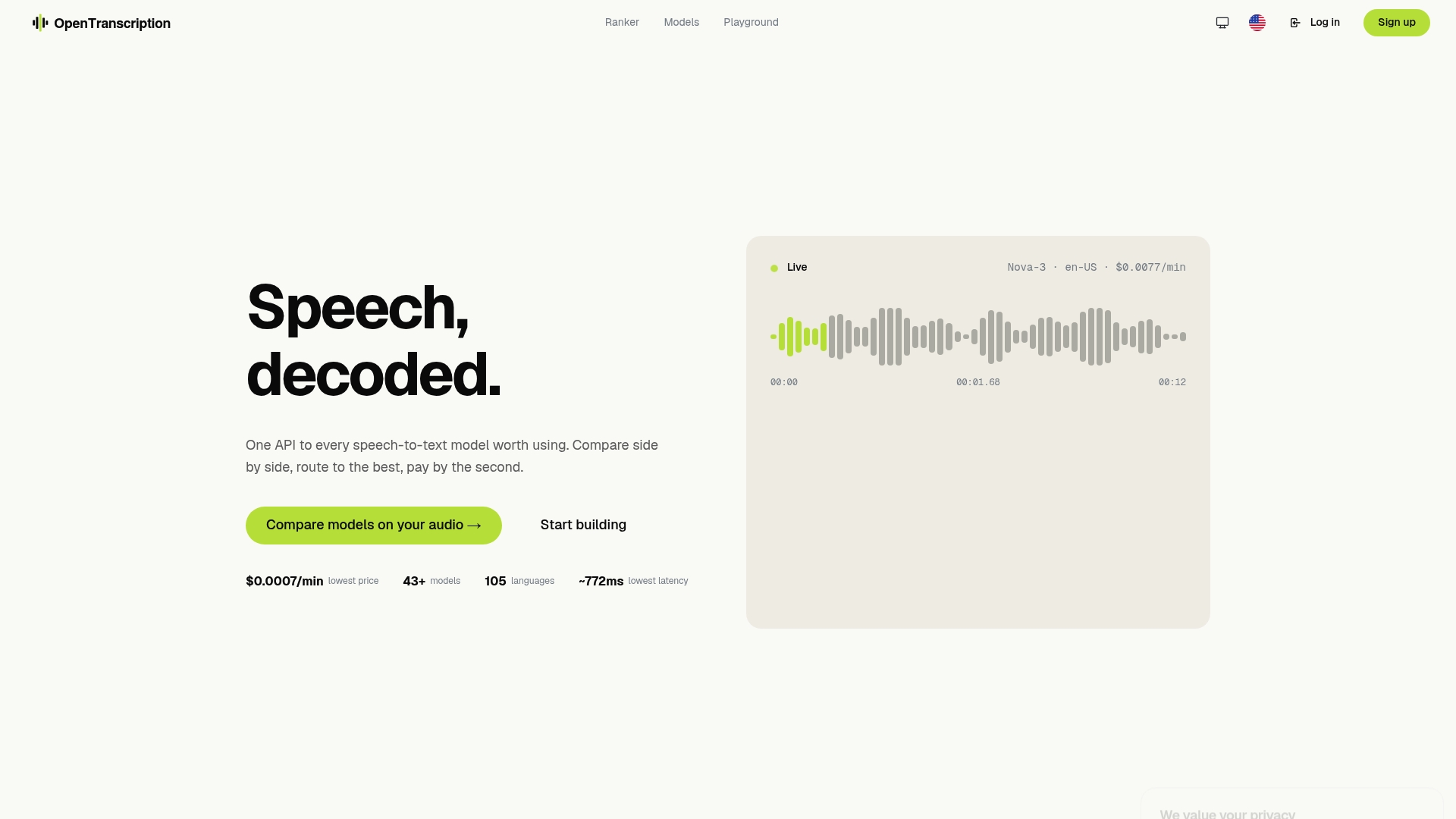
What sets it apart from assembling your own stack is the benchmarking layer: instead of guessing which of dozens of available models fits your audio best, you compare cost, speed, and accuracy side by side before committing. That matters most in the model inference stage this article covers, where the “right” model depends entirely on your specific audio conditions and latency requirements. The API supports realtime streaming with speaker identification and structured transcripts with confidence scores across 105+ languages, covering the diarization and post-processing stages without separate services to maintain.
If you’re evaluating whether to build or buy the pipeline described above, start by comparing models on the OpenTranscription platform against a sample of your own production audio to see where the accuracy and latency numbers land for your use case.
Sources
- Building a Voice AI Pipeline — Let’s Build Solutions
- Design a Speech-to-Text Service — Vibe Engines
- Speech Recognition & Transcription Pipeline (Whisper-based) — README
- NeMo Curator ASR pipeline documentation — NVIDIA
FAQ
What Is the Best Program for Transcribing Audio to Text?
There’s no single best program. The right choice depends on whether you need real-time streaming, batch accuracy, or speaker identification, which is why comparing models on a benchmarking platform against your own audio beats picking one tool by reputation.
Is There an API That Can Convert Audio Files to Text?
Yes. Several APIs handle audio to text conversion, and platforms like OpenTranscription add a layer that lets you benchmark and switch between dozens of underlying models through one integration.
Can ChatGPT Transcribe Audio to Text?
ChatGPT can process audio through connected transcription models, but it isn’t purpose-built for production pipelines needing speaker diarization, word-level timestamps, or per-second billing at scale.
Is There a Way to Automatically Transcribe Audio to Text?
Yes, automated speech to text workflows use ASR models to convert audio into text without manual typing, and a production pipeline adds chunking, diarization, and post-processing around that core model to handle real-world audio conditions.
How Do You Reduce Word Error Rate in a Transcription Pipeline?
Combine vocabulary biasing for domain terms, VAD-based chunking to avoid mid-word cuts, and a language model rescoring pass, then measure improvement with WER on a held-out sample from your actual audio domain.